In today’s digital world, people love to make their social media profiles, messages, captions, and usernames look attractive. Stylish text is a simple way to express creativity and make ordinary words look different. The Stylish Fonts – Fancy Text app is designed for users who want to create decorative text styles, use special symbols, and make their online content more interesting.
Whether you are a student, social media user, content creator, gamer, or business owner, a stylish text application can help you personalize your digital communication. You can use fancy text for Instagram bios, WhatsApp messages, Facebook posts, gaming nicknames, birthday wishes, and other creative purposes. This article explains what the Stylish Fonts – Fancy Text app is, how to download and use it, who can benefit from it, and why you may want to try it.
What Is the Stylish Fonts – Fancy Text App?
Stylish Fonts – Fancy Text is a type of text customization application that helps users transform ordinary text into decorative and visually distinctive styles. Depending on the particular app you install, it may offer fancy fonts, symbols, emojis, text decorations, nickname generators, and copy-and-paste features.
For example, ordinary text such as “Hello Friends” can be transformed into different styles:
- Normal: Hello Friends
- Bold style: 𝐇𝐞𝐥𝐥𝐨 𝐅𝐫𝐢𝐞𝐧𝐝𝐬
- Script style: 𝓗𝓮𝓵𝓵𝓸 𝓕𝓻𝓲𝓮𝓷𝓭𝓼
- Double-struck style: ℍ𝕖𝕝𝕝𝕠 𝔽𝕣𝕚𝕖𝕟𝕕𝕤
- Small-capital style: ʜᴇʟʟᴏ ғʀɪᴇɴᴅs
These examples demonstrate how decorative Unicode characters can change the appearance of text.
Some applications offer a simple text generator where you type a message, choose a style, and copy the result. Others include a dedicated font keyboard that lets you type stylish text in supported messaging applications.
Important: Several apps have similar names. Their features, supported devices, pricing, and keyboard options may differ. Always check the developer name and application details before downloading the version you want.
Main Features of the Stylish Fonts – Fancy Text App
The features available depend on the specific application. Common features include the following.
A. Stylish Font Generator
The font generator is one of the main reasons people use fancy text applications. It converts ordinary English letters into decorative text styles. You can choose a style that matches your personality, message, or social media profile. For example, bold text can highlight a short heading, while a cursive style can make a greeting look more decorative.
B. Fancy Symbols and Emojis
Some versions provide special symbols, hearts, stars, arrows, decorative brackets, and emojis. These elements can be used to personalize a social media bio, create a gaming nickname, or decorate a birthday message.
For example:
♡ Welcome to My Profile ♡
✦ Dream Big | Work Hard ✦
★ Official Creator ★
You can combine symbols with text to create your own designs.
C. Social Media Bio Customization
Your social media bio gives visitors a quick introduction to your personality, interests, or work. Stylish text tools can help you make short profile descriptions more distinctive. You might use decorative text for an Instagram bio, a Facebook profile description, or a creator account. However, avoid using too many special characters. A simple and readable bio is often more useful than one filled with complicated symbols.
D. Stylish Messages and Captions
You can use fancy text in messages, status updates, captions, and greetings.
For example, a birthday greeting can be decorated with hearts and stars, while an important caption can use a bold-looking style to draw attention to a few words.
The generated text can usually be copied and pasted into supported applications.
E. Gaming Nickname Creation
Gamers often look for distinctive usernames that are easy to recognize. A fancy text generator may help you create decorative versions of your preferred gaming name.
For example, you could transform a name such as “Shadow King” into a stylized version and then test whether your game accepts it. Keep in mind that some games restrict special characters or have username length limits. A generated name may not be accepted everywhere.
F. Text Customization Tools
Depending on the app, additional tools may include uppercase and lowercase conversion, reversed text, spacing adjustments, decorative text frames, or custom style creation. Some applications also provide a keyboard or floating shortcut for accessing text styles while using other apps.
G. Copy and Share Options
Many fancy text applications include a copy button or sharing option. This allows you to transfer your selected text into a compatible messaging or social media app without typing it again. The availability of direct sharing and keyboard integration depends on the version you install.
How to Download the Stylish Fonts – Fancy Text App
Follow these steps to download the application safely.
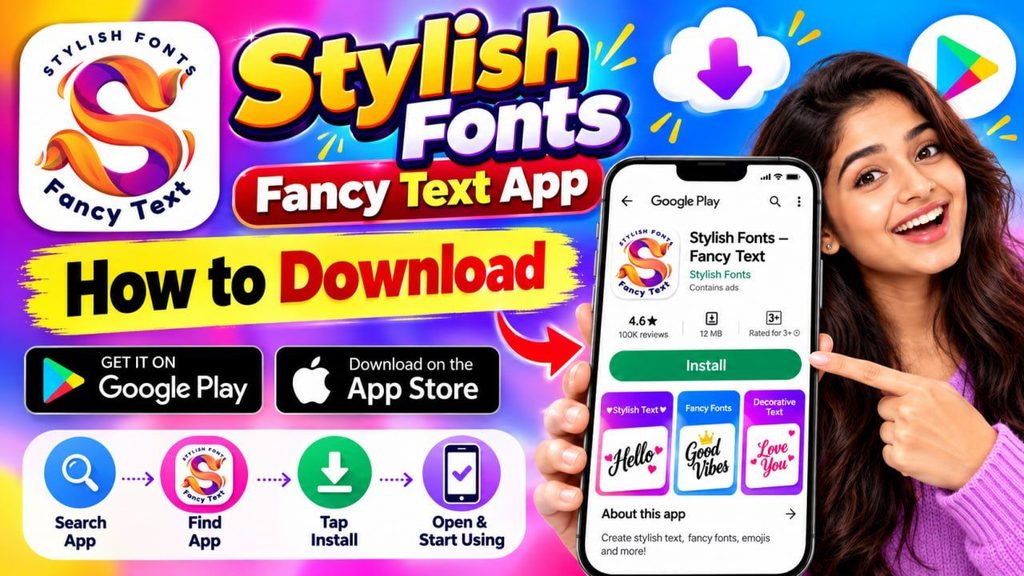
Step 1: Open the Google Play Store
Unlock your Android smartphone and open the Google Play Store. Make sure you have a working internet connection.
Step 2: Search for the Application
Type “Stylish Fonts – Fancy Text” or the exact name of the application you want to install into the search bar. Several applications may have similar names, so do not select an app based only on its icon.
Step 3: Check the App Details
Before installing, check the following information:
- Application name and developer.
- User reviews and ratings.
- Screenshots and available features.
- Device compatibility.
- Advertisements and in-app purchases.
- Privacy information and requested permissions.
These checks can help you identify the correct application.
Step 4: Tap Install
Once you have selected the correct application, tap the Install button. Wait until the download and installation process is complete.
Step 5: Open the App
After installation, tap Open. Follow any initial instructions displayed on the screen. Some apps work immediately as text generators. Others may ask you to enable additional features, such as a custom keyboard.
Step 6: Review Permissions
- If the application requests permissions, read the explanation carefully before allowing access.
- A font generator that only converts and copies text may not need access to your contacts or location. If you choose a keyboard-based version, understand how that keyboard handles the information you type.
- Do not enable accessibility services or grant other sensitive permissions unless you understand why the app needs them.
For iPhone users: Search the App Store for the exact application name and verify that the developer offers an iOS version. Not every Android application is available for iPhone.
How to Use the Stylish Fonts – Fancy Text App Step by Step
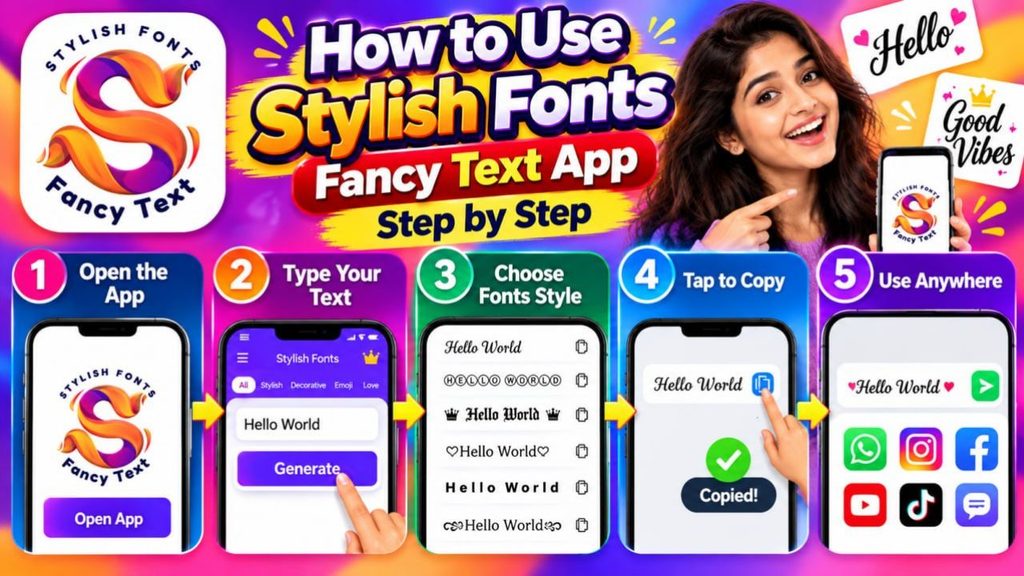
Once you have installed the application, follow this general procedure. The exact buttons may vary depending on the version.
Step 1: Open the Application
Launch the app from your phone’s home screen. You may see a text input box, a list of font styles, symbols, or a keyboard option.
Step 2: Enter Your Text
Type the word, sentence, username, or caption you want to customize.
For example:
“Welcome to My World”
You can begin with a short phrase to understand how the different styles work.
Step 3: Choose a Font Style
Browse the available styles. Select bold, italic-looking, script, decorative, or another style that suits your purpose.
The application may display multiple versions of your text automatically.
Step 4: Preview the Result
Check how the selected text looks before using it. Make sure the letters are readable and the symbols appear correctly.
Some decorative styles may not display properly on every device or platform.
Step 5: Copy the Stylish Text
Tap the Copy button if it is available. The selected text will usually be copied to your phone’s clipboard. If your app uses a different interface, follow its instructions for copying or sharing text.
Step 6: Open Your Preferred Application
Open Instagram, WhatsApp, Facebook, a messaging app, or another supported platform. Navigate to the place where you want to use the text.
For example, open your Instagram profile to edit your bio, or open a WhatsApp conversation to send a message.
Step 7: Paste the Text
Tap the appropriate text field and choose Paste. Check the result before saving or sending it.
Step 8: Save or Share
If you are editing a profile, save the changes. If you are writing a message, review it and send it when ready. You can repeat these steps whenever you want to create another stylish text design.
How to Use Stylish Fonts for Instagram
Instagram users can use fancy text to personalize selected profile fields and captions.
Follow these steps:
- Open the Stylish Fonts application.
- Enter your preferred bio text.
- Choose a readable decorative style.
- Copy the converted text.
- Open Instagram and navigate to your profile.
- Select Edit Profile.
- Paste the text into the appropriate field.
- Review the formatting and save your changes.
You can also try decorative text in captions or other text fields where Instagram supports it. Avoid using elaborate fonts for every sentence. Clear text helps visitors understand your profile and find important information.
How to Use Stylish Fonts in WhatsApp
Fancy text tools can also help you personalize WhatsApp messages and status updates.
Follow these steps:
- Open the text generator.
- Type the message you want to send.
- Select a suitable style.
- Copy the result.
- Open WhatsApp.
- Choose a conversation or status field.
- Paste the text and check the result.
- Send or publish it.
For example, you can use decorative text for birthday wishes, festival greetings, short announcements, or group messages. Some apps provide a custom keyboard that can be enabled in your phone settings. If you use this option, review its privacy implications first. Copy-and-paste functionality may be sufficient for occasional use.
Who Can Use the Stylish Fonts – Fancy Text App?
A fancy text application can be useful for many types of users.
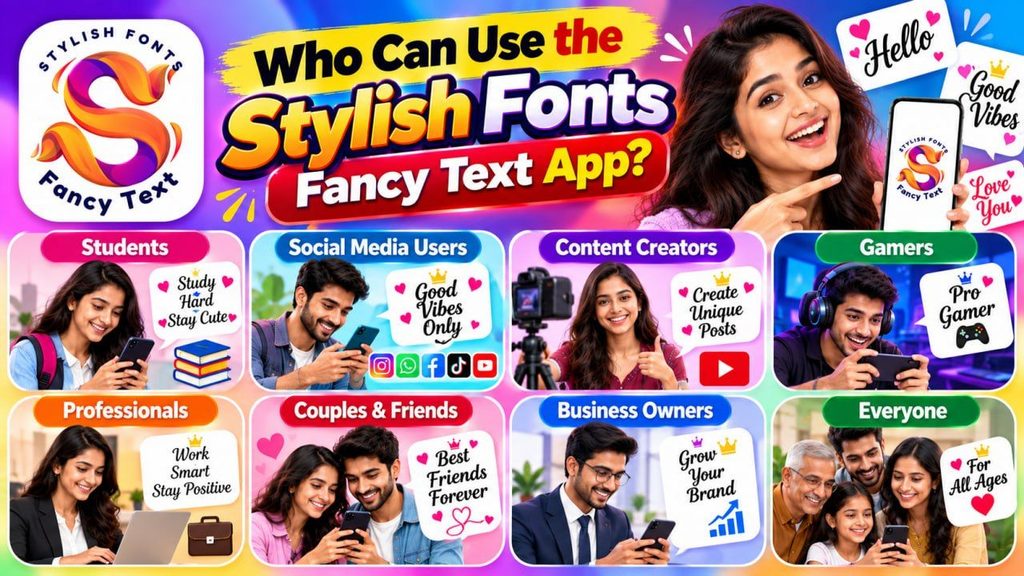
A. Students
Students can use decorative text for social media bios, informal messages, group names, and creative digital projects.
For formal assignments, examination documents, and applications, they should use standard readable fonts unless decorative text is specifically requested.
B. Social Media Users
People who regularly use Instagram, Facebook, WhatsApp, and other social platforms can use stylish text to personalize selected profile details, captions, and messages.
C. YouTubers and Content Creators
YouTubers and other creators can use fancy text for social media bios, community messages, promotional captions, and informal announcements.
For video thumbnails, however, it is generally better to use an image editor that supports proper font selection, sizing, and layout control.
D. Gamers
Gamers can experiment with decorative usernames and team names. Before using a generated name, check the game’s character restrictions and naming rules.
E. Small Business Owners
Small business owners can use stylish text in selected promotional messages, social media bios, and festive greetings. They should keep business names, prices, contact details, and important offers easy to read.
F. Digital Creators and Freelancers
Freelancers, designers, bloggers, and digital marketers may find these tools useful when preparing informal social media content or personalized messages.
G. People Who Enjoy Creative Messaging
Anyone who enjoys decorating messages, creating unique names, or adding special symbols to text can explore a fancy text generator. You generally do not need advanced graphic design skills to use a basic copy-and-paste tool.
Why Should You Download the Stylish Fonts – Fancy Text App?
There are several reasons to consider using a fancy text application.
- Make Ordinary Text More Attractive: The app can help you turn plain text into a decorative style without manually searching for individual special characters.
- Save Time: Instead of creating every design character by character, you can enter a phrase, select a style, and copy the result.
- Personalize Your Online Identity: Decorative text can help you express your interests or personality through selected profile descriptions and usernames.
- Create Interesting Greetings: You can make birthday wishes, anniversary greetings, festival messages, and short personal notes look more decorative.
- Experiment With Different Styles: You can compare multiple text styles and choose one that fits your intended message.
- Create Distinctive Usernames: A text generator can provide ideas for unique-looking gaming names or social media usernames, subject to each platform’s rules.
- Use It Without Advanced Design Skills: Most basic text generators are designed for straightforward use. You can create a result by typing, selecting, copying, and pasting.
Choose Features That Match Your Needs
Depending on the version, you may find extra features such as symbols, text decorations, custom keyboards, or nickname tools. You can select an application based on the features you actually need.
Important Things to Know Before Using the App
Although fancy text tools can be useful, there are a few limitations to understand.
- Compatibility: Some styles may not display correctly on all phones, operating systems, or social media platforms.
- Language support: Many decorative Unicode styles are primarily designed for Latin letters. Kannada and other Indian-language characters may not convert into the same styles. Test your preferred language before relying on the feature.
- Readability: Highly decorative text can be difficult to read, especially in long messages. Use fancy styles selectively.
- Accessibility: Screen readers may pronounce unusual Unicode characters unpredictably. Standard text is usually better for important information.
- Keyboard privacy: If you enable a third-party keyboard, review its permissions and privacy policy. Never enter passwords, banking details, or other sensitive information into an unfamiliar keyboard.
- Advertisements and purchases: Some apps display advertisements or offer paid features. Review the app’s terms before making a purchase.
- Platform rules: Instagram, WhatsApp, games, and other services may restrict certain characters or display them differently.
- Official app verification: Search results can contain several apps with similar names. Confirm the developer and features before installing.
Is the Stylish Fonts – Fancy Text App Free?
The cost depends on which application you choose.
- Some fancy text applications provide free text generation and copy-and-paste features. Others include advertisements, in-app purchases, subscriptions, or premium styles.
- Before downloading, review the pricing information shown in the relevant app store. Do not assume that every feature is free simply because the Install button is available.
- If your needs are limited to converting a few words into decorative text, a basic free version may be enough.
Tips for Getting the Best Results
To get more value from a stylish text application, keep the following suggestions in mind:
- Choose fonts that are easy to read on small screens.
- Use special symbols only where they improve the appearance.
- Preview text before publishing it.
- Test the result in the destination app.
- Keep important contact details and announcements in standard text.
- Avoid unnecessary permissions.
- Check whether Kannada characters work properly if you primarily communicate in Kannada.
- Do not use decorative text to imitate an official identity or mislead other users.
These simple practices can help you create attractive content while maintaining clarity and safety.
Conclusion:
The Stylish Fonts – Fancy Text app category offers a simple way to personalize text for social media profiles, messages, greetings, usernames, and other everyday digital activities. By typing a phrase, selecting a style, and copying the result, users can create decorative text without advanced design skills. Students, social media users, content creators, gamers, and small business owners may find these tools useful for informal communication and creative expression.
To get started, search for the exact app name in the Google Play Store or Apple App Store, check its developer and features, and install the version that suits your device. Begin with a short message, test different styles, and use the results wherever they are supported. Ultimately, the best fancy text style is one that looks attractive while remaining easy for others to understand.