Finding the right clothes at a good price does not always mean visiting multiple shops or browsing large online marketplaces. Nearby Clothes is designed to make clothing discovery easier by connecting users with clothing listings available near their location.
Whether you want to buy affordable clothes, sell clothes you no longer use, or donate them to someone nearby, the app provides a simple way to discover and manage clothing listings in one place.
What is Nearby Clothes?
Nearby Clothes is a location-based clothing marketplace where users can buy, sell, or donate clothes and fashion items near them.
The app focuses on nearby listings, making it easier to discover products based on location, category, price, size, color, and condition.
| Feature | What it helps you do |
|---|---|
| Nearby Listings | Find clothes available around your location |
| Categories | Browse Men, Women, Kids, School Wear and more |
| Map Search | See nearby listings on a map |
| Sell | List clothes and set your own price |
| Donate | Give away usable clothes for free |
| Favorites | Save products you may want later |
| Chats | Communicate with buyers or sellers |
| Profile | Manage your account and listings |
| Multiple Photos | Add up to 5 photos to a listing |
| Location Radius | Search within a selected distance |
How to Download Nearby Clothes?
The Nearby Clothes app can be downloaded on both Android and Apple devices. Users can install the app directly from the official app store available on their smartphone.
For Android Users
Android users can download Nearby Clothes from the Google Play Store.
- Open the Google Play Store on your smartphone.
- Search for “Nearby Clothes”.
- Select the official Nearby Clothes app.
- Tap on Install.
- Wait for the app to download and install.
- Open the app and complete the registration or login process.
For iPhone Users
iPhone users can download the app from the Apple App Store.
- Open the App Store on your iPhone.
- Search for “Nearby Clothes”.
- Select the official app.
- Tap Get.
- Confirm the installation using Face ID, Touch ID or Apple ID if required.
- Once installed, open the app and create an account or log in.
Download Availability
| Device | Download Platform |
|---|---|
| Android | Google Play Store |
| iPhone / iPad | Visit Website |
Why Should You Use Nearby Clothes?
One of the biggest advantages of Nearby Clothes is its local-first approach. Instead of searching through products from far-away locations, users can discover clothing listings closer to them.
This can be particularly useful when you want to:
- Find affordable clothing nearby
- Sell unused clothes
- Give away clothes instead of throwing them away
- Compare different local listings
- Find clothes according to category, size and color
- Contact sellers directly
- Discover products through a map
Home Page – Discover Clothes Near You
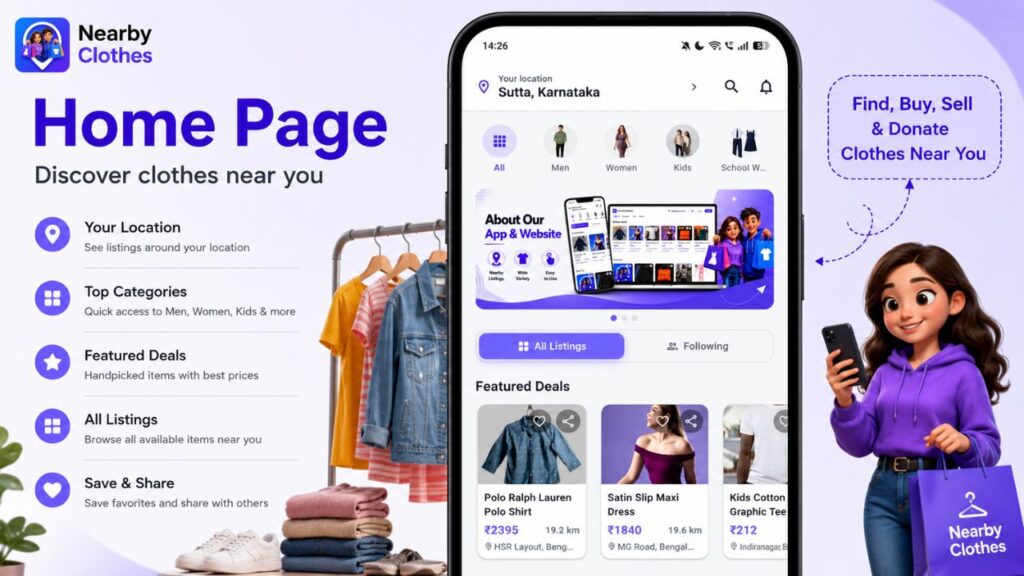
The Home Page is the first screen users see when they open the Nearby Clothes app. It provides quick access to clothing listings and helps users discover products available near their location.
At the top, users can see their current location, which helps the app show relevant nearby listings. Users can also quickly browse categories such as Men, Women, Kids and School Wear.
The Home Page includes Featured Deals, where selected clothing items are displayed with information such as price, distance and location. Below this, users can browse All Listings to discover more products.
Main Home Page Features
| Feature | Purpose |
|---|---|
| Location | Shows listings based on the user’s location |
| Categories | Quickly browse different clothing types |
| Featured Deals | Discover selected clothing listings |
| All Listings | Browse available products |
| Favorites | Save interesting products |
| Share | Share a listing with others |
| All Listings / Following | Switch between general listings and followed content |
The Home Page is especially useful for users who want to quickly discover clothes without searching through complicated menus.
Categories – Find the Right Type of Clothing
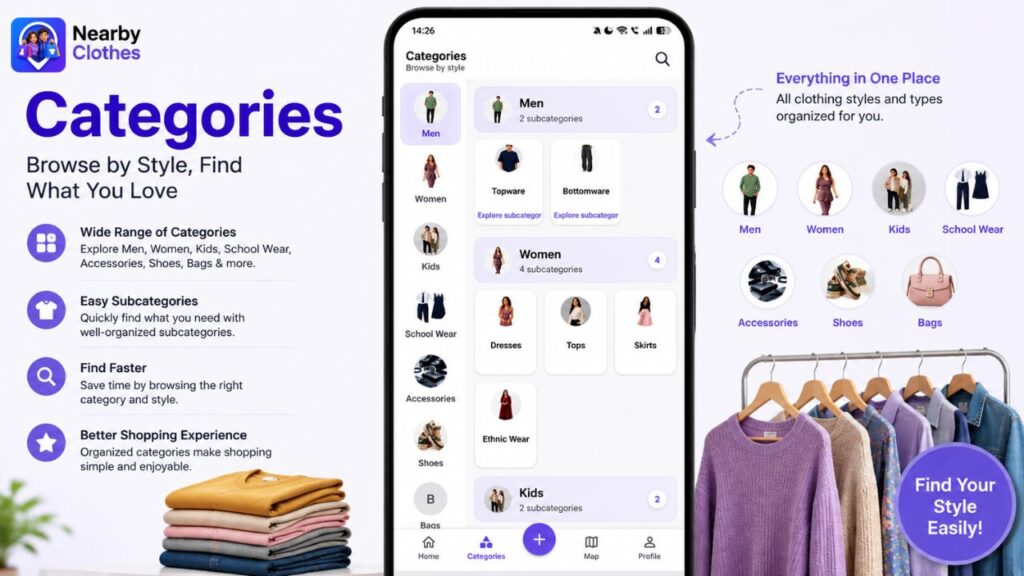
The Categories section organizes clothing and fashion items into different groups. Instead of scrolling through every listing, users can select the category they are interested in.
The app provides categories such as Men, Women, Kids, School Wear, Accessories, Shoes and Bags.
Some categories also contain subcategories. For example, Women includes Dresses, Tops, Skirts and Ethnic Wear, while Men includes Topwear and Bottomwear.
Categories Available
| Main Category | Example Subcategories |
|---|---|
| Men | Topwear, Bottomwear |
| Women | Dresses, Tops, Skirts, Ethnic Wear |
| Kids | Children’s clothing |
| School Wear | School clothing and uniforms |
| Accessories | Fashion accessories |
| Shoes | Footwear |
| Bags | Different types of bags |
This makes the shopping experience more organized and saves users time when looking for a particular type of clothing.
Map – Find Nearby Clothing Listings
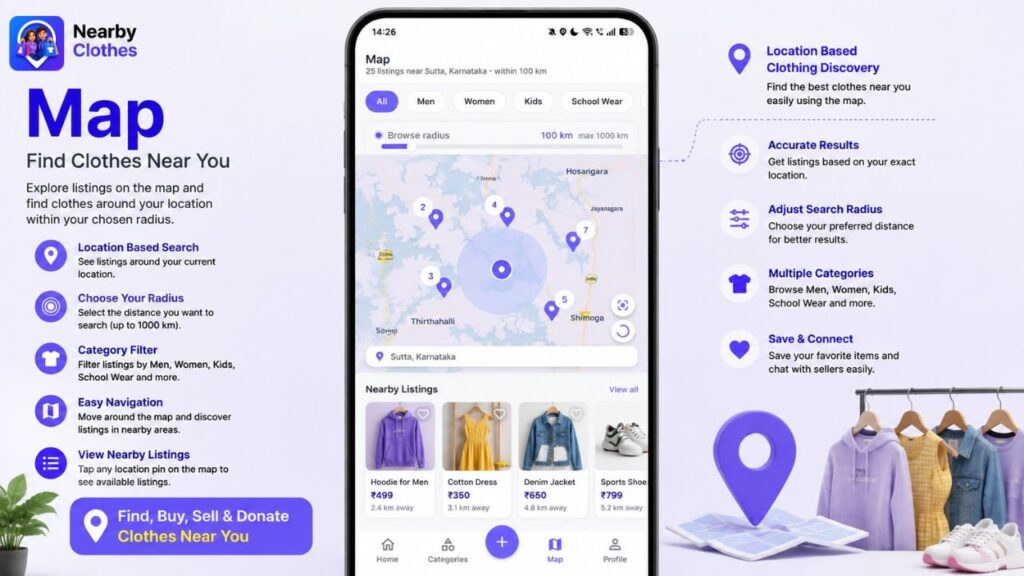
The Map section is one of the key features of Nearby Clothes. It allows users to discover clothing listings based on their geographical location.
Users can choose a browse radius, such as 100 km, and view available listings around the selected area.
The map can show the approximate locations of listings, while the Nearby Listings section below the map displays products available within the selected area.
How to Use the Map
| Step | Action |
|---|---|
| 1 | Open the Map section |
| 2 | Select a category if required |
| 3 | Set the preferred search radius |
| 4 | View listings on the map |
| 5 | Browse nearby products |
| 6 | Open a listing to see more details |
This feature can be useful for people who prefer local buying and selling, as they can discover products closer to their location.
Profile – Manage Your Account & Listings
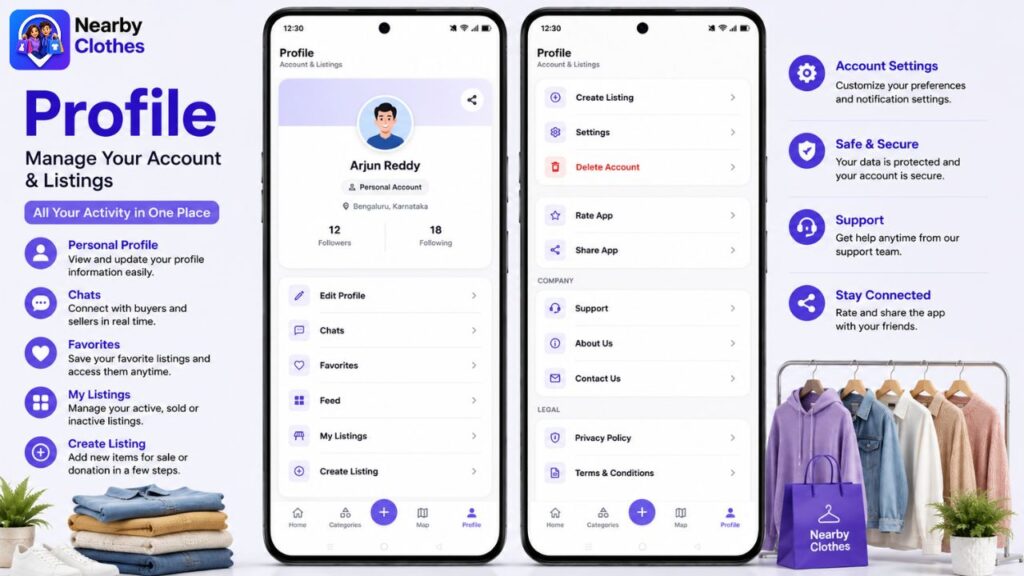
The Profile section is the personal management area of the Nearby Clothes app. Users can view their account information and manage their listings from one place.
The profile page displays information such as the user’s name, account type, email address, followers and following.
Users can also access important options including Edit Profile, Chats, Favorites, Feed and My Listings.
Profile Features
| Feature | What it does |
|---|---|
| Edit Profile | Update personal profile information |
| Chats | Communicate with other users |
| Favorites | View saved listings |
| Feed | Explore relevant content |
| My Listings | Manage your posted items |
| Create Listing | Add a new clothing listing |
| Settings | Manage app preferences |
| Support | Get help with the app |
| About Us | Learn about the platform |
| Contact Us | Contact the company |
| Privacy Policy | View privacy information |
| Terms & Conditions | Understand platform rules |
The Profile section is particularly important for sellers because they can manage their listings, account details and conversations with potential buyers from here.
Find Clothes Near Your Location
The Map feature is one of the useful parts of the app. Users can select a search radius and view listings available within that area.
For example, if you select a 100 km radius, the app can show available listings around your selected location.
How the Nearby Search Works
- Open the Nearby Clothes app.
- Allow location access if required.
- Open the Map section.
- Select a clothing category.
- Adjust the search radius.
- Browse available nearby listings.
- Select an item to view its details.
This makes the app useful for people who prefer local buying and selling.
Buy Clothes Easily
The Home screen displays Featured Deals and All Listings, allowing users to discover products quickly.
Each listing can provide important information such as:
- Product photo
- Product name
- Price
- Distance
- Location
- Category
- Seller information
You can also use the Favorite option to save items you’re interested in.
Sell Your Unused Clothes
Nearby Clothes is not only for buyers. Users can also turn unused clothes into an opportunity by creating their own listings.
How to List an Item
| Step | What to do |
|---|---|
| 1 | Open List an Item |
| 2 | Add product photos |
| 3 | Select Sell or Donate |
| 4 | Enter the title |
| 5 | Select the category |
| 6 | Add condition and item details |
| 7 | Add size and color |
| 8 | Enter price if selling |
| 9 | Add required contact details |
| 10 | Publish the listing |
The listing form also allows sellers to provide additional information about used clothing, such as times worn, days used and usage details. This helps potential buyers understand the actual condition of the item.
Sell or Donate – You Choose
A particularly useful feature is the option to choose between Sell and Donate.
| Sell | Donate |
|---|---|
| Set your own price | Give the item away for free |
| Suitable for unused or used clothes | Useful for clothes you no longer need |
| Connect with potential buyers | Help someone who needs clothing |
| Turn unwanted clothes into value | Encourage reuse |
This makes the app useful not only as a marketplace but also as a platform for clothing reuse and sharing.
Add Detailed Information About Used Clothes
When listing a used item, sellers can provide additional details such as:
- Times worn
- Number of days used
- More information about usage
- Size
- Color
- Custom size or color information
Providing accurate information can help buyers make better decisions before contacting the seller.
Who Can Benefit From Nearby Clothes?
Nearby Clothes can be useful for different types of users.
| User | Benefit |
|---|---|
| Buyers | Find clothing at nearby locations |
| Sellers | Sell unwanted clothes locally |
| Families | Find clothes for different age groups |
| Students | Search for affordable clothing and school wear |
| Donors | Give usable clothes to others |
| Local sellers | Reach people searching nearby |
What Makes Nearby Clothes Different?
Traditional online shopping often focuses on products being shipped from different locations. Nearby Clothes focuses more on connecting people with clothing listings around them.
Its combination of local listings + categories + map search + selling + donation gives users multiple ways to use the platform.
In Simple Words
Want to buy? → Find nearby clothes.
Want to sell? → Create a listing and set a price.
Want to donate? → List it for free.
Want to explore? → Browse categories or use the map.
Want to save something? → Add it to Favorites.
Final Thoughts
Nearby Clothes aims to make clothing discovery more local, simple and convenient. Instead of keeping unused clothes in the wardrobe or throwing them away, users can sell them, donate them or connect with someone who may need them.
With features such as nearby listings, category browsing, map-based search, favorites, chat, detailed item information and easy listing creation, the app provides a practical way to discover and share clothing within the local community.
If you are looking for affordable clothes, want to sell clothes you no longer use, or simply want to donate them, Nearby Clothes offers a simple platform to get started.