Buying or selling a bike can sometimes be a difficult and time-consuming process. Buyers need to search for suitable bikes, compare prices, check locations, contact sellers and inspect vehicles. Sellers, on the other hand, need a convenient platform where they can showcase their bikes to potential buyers.
Nearby Bikes is designed to make this process easier by bringing bike listings, location-based discovery, categories, businesses, maps, communication and user profiles together in one mobile application. The app focuses on a simple idea: helping people discover bikes and bike-related businesses near their location.
What is the Nearby Bikes App?
Nearby Bikes is a location-focused marketplace application designed for people who want to buy, sell and discover bikes.
Instead of searching through a large marketplace without knowing how far away a bike is, users can explore listings based on their location and preferred browsing radius.
The app can be useful for:
| User Type | How Nearby Bikes Can Help |
|---|---|
| Bike Buyers | Find motorcycles and scooters near their location |
| Bike Sellers | Create and publish bike listings |
| Dealers | Showcase bikes and business listings |
| Rental Businesses | Promote bike-related business services |
| Bike Wash Businesses | Help local customers discover services |
| Bike Enthusiasts | Browse different brands, models and categories |
This location-oriented approach can make the search process more convenient, particularly for users who prefer to inspect a bike physically before making a purchase.
Why Should You Use Nearby Bikes?
One of the main reasons to use Nearby Bikes is convenience.
If someone wants to purchase a used motorcycle, they may otherwise have to search multiple platforms, check different locations and contact several sellers.
Nearby Bikes brings many of these activities together in one application.
The platform allows users to:
- Discover nearby bikes
- Search by brand
- Search by bike type
- Compare prices
- Check listing locations
- View bike photographs
- Save interesting listings
- Contact sellers
- Chat with users
- Sell their own bikes
- Discover bike-related businesses
- Browse listings using a map
How to Download the Nearby Bikes App?
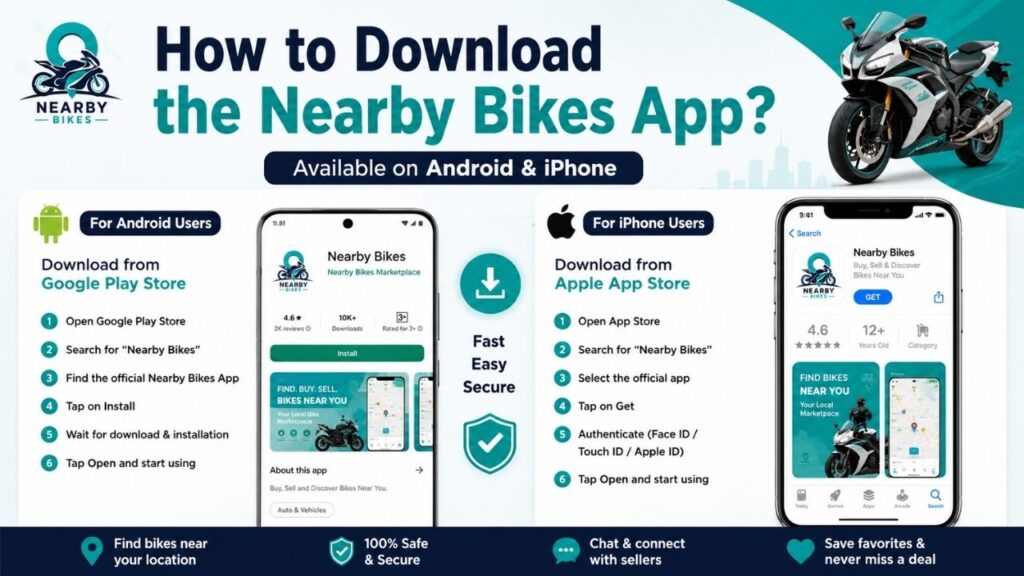
If you want to buy, sell or discover bikes using Nearby Bikes, you first need to install the application on your smartphone.
The app is designed to be accessible to users on both Android and Apple iOS devices, making it convenient for a wide range of smartphone users.
You can download the app from the official app store available on your device.
Download Nearby Bikes on Android
Android smartphone users can download the Nearby Bikes application through the Google Play Store.
Steps to Download on Android
- Open the Google Play Store on your Android smartphone.
- Tap the search bar.
- Search for Nearby Bikes.
- Look for the official Nearby Bikes application.
- Check the app name and developer information carefully.
- Tap Install.
- Wait for the application to download and install.
- Once installation is completed, tap Open.
- Create or access your account and start using the application.
Android Download
[INSERT IMAGE HERE – Add a screenshot of the Nearby Bikes app on Google Play Store]
It is always recommended to download the application from the official Google Play Store rather than installing APK files from unknown websites. This helps users avoid potentially unsafe or modified application files.
Download Nearby Bikes on Apple iPhone
Apple iPhone users can download Nearby Bikes through the Apple App Store.
Steps to Download on iPhone
- Open the App Store on your iPhone.
- Tap the Search option.
- Enter Nearby Bikes in the search bar.
- Find the official Nearby Bikes application.
- Check the application name and developer information.
- Tap Get.
- Authenticate using Face ID, Touch ID or your Apple ID password if required.
- Wait for the app to install.
- Tap Open once installation is complete.
- Sign in or create an account and start exploring the app.
Apple App Store
Yes. Nearby Bikes is intended to be available for users on both major mobile platforms:
| Platform | Download Store | Availability |
|---|---|---|
| Android | Google Play Store | Available |
| iPhone/iOS | Apple App Store | Available |
This means users do not need to switch to another device simply to access the Nearby Bikes marketplace.
Whether you use an Android smartphone or an iPhone, you can install the application through the appropriate official app store.
What Should You Check Before Downloading?
When searching for the app, users should make sure they are selecting the official Nearby Bikes application.
Before installing, check:
| What to Check | Why It Matters |
| App Name | Make sure it is the correct application |
| Developer Name | Helps identify the official app |
| App Logo | Compare it with the official Nearby Bikes branding |
| Screenshots | Check whether the interface matches the actual app |
| Store Listing | Download only from the official store |
| Permissions | Review the permissions requested by the app |
Nearby Bikes App Home Screen
The Home screen gives users a quick overview of bikes available near them. Users can browse listings, check prices, view photographs and see the approximate distance from their current location.
Nearby Bikes Categories Screen
The Categories section helps users organize their search according to brands and bike types.
Discover Bikes Near You
The Home section is designed around nearby discovery.
Users can see bike listings along with important information such as the bike name, price, fuel type, photographs and approximate distance.
For example, the screenshots show listings for models such as:
| Example Listing | Displayed Price |
|---|---|
| KTM 390 Adventure | ₹2,50,000 |
| Yamaha FZ-S V2.0 (2022) | ₹85,000 |
| Honda Activa 6G | ₹52,000 |
| Royal Enfield Classic 350 | ₹1,28,000 |
These listings demonstrate how users can quickly compare different bikes from the Home or Categories sections.
Note: Prices shown in listings are seller-provided asking prices and may change. Buyers should independently verify the vehicle, documents and final negotiated price.
Search Bikes by Brand
The Categories section provides brand-based browsing.
This can be useful when a buyer already has a preferred manufacturer in mind.
For example, users may want to specifically search for:
- Yamaha
- Honda
- KTM
- Royal Enfield
- Other available brands
Instead of scrolling through every listing, users can use the available brand categories to narrow their search.
Brand Filters
Brand filtering can make the browsing experience more organized, especially when the marketplace contains a large number of listings.
Search by Bike Type
Nearby Bikes also provides type-based categories.
The displayed interface includes categories such as:
| Bike Type | Suitable For |
|---|---|
| Motorcycles | Users looking for regular motorcycles |
| Heritage | Users interested in heritage/classic-style bikes |
| Scooters | Users looking for scooters |
| All Types | Users who want to browse everything |
This feature helps users focus on the kind of vehicle they actually want.
For example, someone looking for a scooter does not necessarily need to browse through every motorcycle listing.
Sell Your Bike Through Nearby Bikes
One of the major features of the application is the ability to list a bike for sale.
The Sell option allows an owner to create a listing by providing photographs and important information about the vehicle.
Sell a Bike Screen
The listing interface includes sections for photographs, bike details, location and publishing the listing.
A seller can provide information such as:
| Listing Information | Purpose |
|---|---|
| Title | Clearly describe the bike |
| Brand | Identify the manufacturer |
| Category | Select the relevant bike category |
| Price | Mention the asking price |
| Model/Year | Help buyers understand the vehicle age |
| Number of Owners | Provide ownership information |
| Photos | Show the actual condition of the bike |
| Location | Help buyers understand where the bike is available |
Providing complete information can help potential buyers understand the listing before contacting the seller.
Bike Photos Section
Clear and genuine photographs can make a listing easier for buyers to understand.
Add Detailed Vehicle Information
The Details section allows sellers to provide important information about their bike.
The interface shown in the screenshots includes fields such as title, brand, category, price, model/year and number of owners.
A detailed listing is generally more useful than a listing with only a price and a single photograph.
For example:
Weak Listing
“Bike for sale – ₹80,000”
Better Listing
“Yamaha FZ-S V2.0, 2022 model, petrol, well-maintained, second owner, ₹85,000”
The second example provides a buyer with much more information before starting a conversation.
Location-Based Bike Listings
Location is one of the most important aspects of Nearby Bikes.
The Sell screen explains that the listing uses the user’s live GPS location.
Live GPS Location Screen
[INSERT IMAGE HERE – Add the screenshot showing Live GPS and Hosnagar, Karnataka]
This location-focused approach can be useful because buying a physical vehicle often requires the buyer to travel to the seller’s location.
A nearby listing can make it easier to:
- Contact the seller
- Visit the location
- Inspect the bike
- Check documents
- Discuss the price
- Complete the transaction if everything is satisfactory
Browse Bikes Using a Map
The Map section allows users to discover nearby listings geographically.
The screenshot shows a Browse Radius feature with a displayed range of 100 km and an option to increase the maximum browsing range.
Map and Browse Radius
The radius feature is useful because different buyers have different travel preferences.
| Search Preference | Suggested Approach |
|---|---|
| Very close to home | Use a smaller browsing radius |
| Willing to travel locally | Increase the radius moderately |
| Looking for a specific model | Increase the radius to find more listings |
| Flexible about location | Use a wider search area |
This gives users more control over how far they are willing to search.
Discover Nearby Bike-Related Businesses
Nearby Bikes is not only focused on individual bike listings.
The Map section also provides business-related categories.
The screenshots show options including:
- Bikes
- Bike wash & detailing
- Other available business categories
Business Features Screen
[INSERT IMAGE HERE – Add the screenshot showing Bikes and Bike Wash & Detailing]
This can be useful for people who need services after purchasing or owning a bike.
For example, users may want to find:
- Bike wash services
- Detailing services
- Local bike dealers
- Bike rental businesses
- Other bike-related businesses
Adjustable Browse Radius
One useful feature shown in the Map section is the adjustable browsing radius.
The screenshot displays:
100 km
with a maximum range of:
1000 km
This allows users to decide how broad their search should be.
For example, if a user cannot find a suitable bike within 50 or 100 km, they may increase the radius and search a larger area.
This can be particularly helpful when searching for a specific or uncommon model.
Contact Sellers Easily
The Sell screen indicates that sellers need to add their phone and WhatsApp number before publishing a listing.
The purpose is to provide buyers with ways to communicate with sellers.
Potential buyers can use the available contact options to ask questions about:
- Price
- Availability
- Bike condition
- Model year
- Ownership
- Documents
- Service history
- Inspection timing
Good communication can help both buyers and sellers save time.
Chat Feature
The Profile section includes a Chats option.
Profile and Chat Section
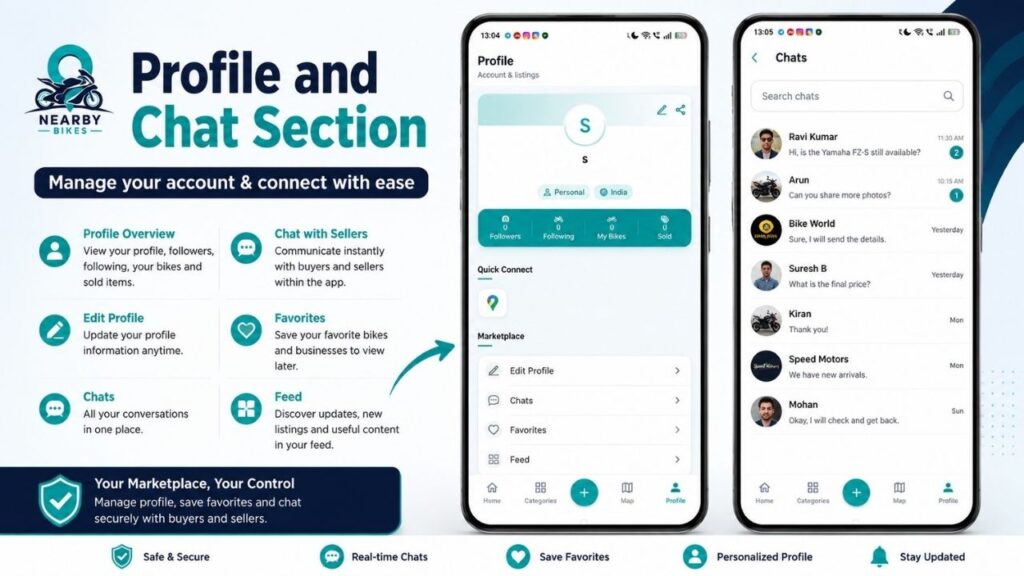
A chat facility can be useful for marketplace communication because buyers may have several questions before visiting a bike.
For example:
| Buyer Question | Why It Matters |
|---|---|
| Is the bike still available? | Avoids unnecessary travel |
| What is the final price? | Helps with budget planning |
| How many owners? | Helps evaluate the vehicle |
| Is insurance available? | Important for verification |
| Can I inspect the bike? | Helps arrange a visit |
| Is there any major damage? | Helps assess condition |
Save Bikes with Favorites
The Profile section includes a Favorites option.
This is useful when a user finds multiple bikes but does not want to make an immediate decision.
A buyer can keep interesting listings saved and compare them later.
For example, a buyer may shortlist:
| Bike | Price | Location | Decision |
|---|---|---|---|
| Bike A | ₹80,000 | 20 km | Shortlisted |
| Bike B | ₹95,000 | 35 km | Shortlisted |
| Bike C | ₹75,000 | 80 km | Compare later |
This makes the buying process more organized.
Profile and Marketplace Activity
The Profile section provides users with a central place to manage their marketplace activity.
The screenshot shows statistics including:
- Followers
- Following
- My Bikes
- Sold
This allows users to get a quick overview of their activity on the platform.
Nearby Bikes Profile Screen
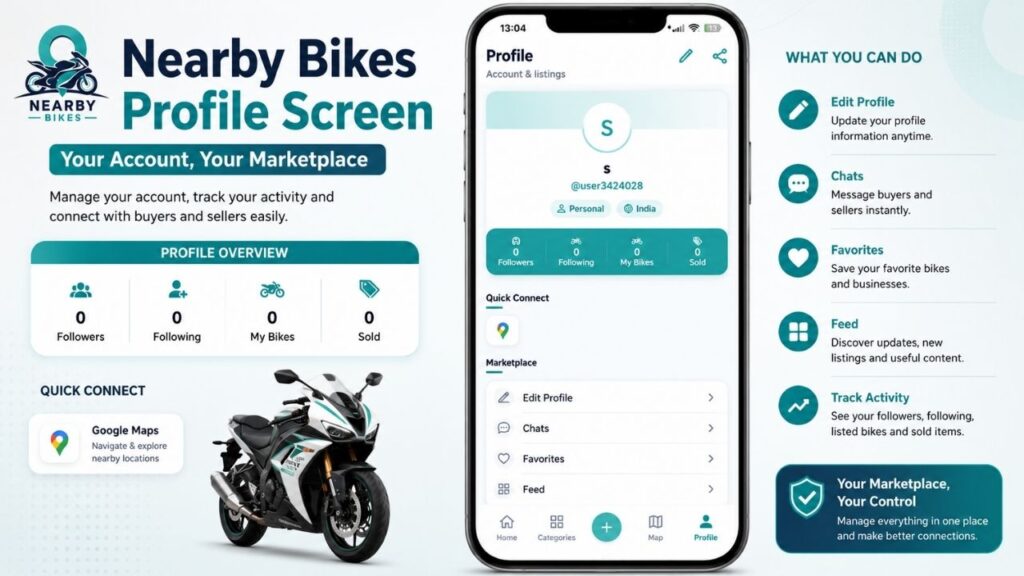
The Profile section also provides options such as:
- Edit Profile
- Chats
- Favorites
- Feed
This makes the profile more than just an account-information page.
Quick Connect and Navigation
The Profile screen also shows a Quick Connect section with a Google Maps-related option.
For a location-based marketplace, navigation can be useful because buyers may eventually need to travel to a seller’s location to inspect a vehicle.
This can make the process from finding a bike → contacting the seller → reaching the location more convenient.
How to Sell a Bike on Nearby Bikes
The selling process can be completed through a series of simple steps.
| Step | What You Need to Do |
|---|---|
| 1 | Open the Sell option |
| 2 | Add phone and WhatsApp contact details |
| 3 | Upload 1–5 bike photographs |
| 4 | Enter title, brand and category |
| 5 | Add the asking price |
| 6 | Enter model/year and ownership details |
| 7 | Check the live GPS location |
| 8 | Review all information |
| 9 | Publish the listing |
Complete Sell Listing
Before publishing, sellers should carefully check the information because incorrect details can create confusion for potential buyers.
How to Find a Bike on Nearby Bikes
Finding a bike can also be done through a simple process.
| Step | Action |
|---|---|
| 1 | Open the Home section |
| 2 | Browse nearby listings |
| 3 | Select a brand if required |
| 4 | Select a bike type |
| 5 | Compare prices |
| 6 | Check location and distance |
| 7 | Open interesting listings |
| 8 | Save listings to Favorites if needed |
| 9 | Contact or chat with the seller |
| 10 | Inspect the bike before purchasing |
Who Should Use Nearby Bikes?
Nearby Bikes can be useful for different types of users.
For Bike Buyers
If you are looking for a used motorcycle or scooter, the app can help you discover listings based on location, brand and type.
For Bike Sellers
If you want to sell your existing bike, you can create a listing with photographs, price and vehicle information.
For Dealers
Dealers can potentially use business-related features to showcase their offerings to local users.
For Bike Service Businesses
Bike wash and detailing businesses can benefit from being discoverable to people searching for bike-related services.
For Bike Enthusiasts
People who enjoy exploring different bikes can browse categories, brands and nearby listings.
Advantages of Nearby Bikes at a Glance
| Feature | Benefit to Users |
|---|---|
| Nearby Listings | Find bikes closer to your location |
| Brand Filters | Search specific manufacturers |
| Type Filters | Find motorcycles, scooters and other categories |
| Map | Understand where listings are located |
| Browse Radius | Control how far you want to search |
| Sell Option | Create your own bike listing |
| Photo Upload | Show the actual bike condition |
| Phone & WhatsApp | Make seller communication easier |
| Chat | Discuss details with sellers |
| Favorites | Save interesting bikes |
| Profile | Manage marketplace activity |
| Business Listings | Discover bike-related businesses |
Important Things Buyers Should Check Before Buying
Nearby Bikes can help users discover and communicate about bikes, but buyers should still independently verify the vehicle before paying.
Before purchasing a used bike, check:
- Registration certificate
- Insurance
- Vehicle identification details
- Service history
- Engine condition
- Tyres
- Brakes
- Lights
- Odometer reading
- Number of previous owners
- Accident history
- Major repairs
- Outstanding loan or legal issues
- Overall vehicle condition
It is also recommended to physically inspect the bike and verify the documents before completing the transaction.
Tips for Sellers
A well-prepared listing can make it easier for potential buyers to understand the bike.
| Seller Tip | Why It Helps |
|---|---|
| Upload clear photographs | Buyers can understand the bike’s condition |
| Mention the correct model/year | Provides accurate information |
| Enter a realistic price | Attracts relevant buyers |
| Add ownership details | Improves transparency |
| Mention important issues | Avoids misunderstandings |
| Keep phone/WhatsApp details correct | Helps buyers contact you |
| Provide accurate location information | Makes inspection easier |
Final Verdict
Nearby Bikes is designed to bring the local two-wheeler marketplace into one convenient application. Instead of simply browsing a large collection of bikes, users can focus on what is available near them.
The app combines several useful functions, including:
Bike Discovery + Selling + Categories + Brand Filters + Map + Location + Business Discovery + Chat + Favorites + Profile
For buyers, it can provide a convenient starting point for finding motorcycles and scooters nearby.
For sellers, it provides a structured way to showcase their bike with photographs, price, vehicle details and contact information.
For businesses, the platform can provide a way to become discoverable to people interested in bikes and related services.