Social media has become much more than a platform for entertainment. Today, creators on Instagram, Facebook, YouTube and YouTube Shorts can use their content and audience to participate in promotional campaigns and explore earning opportunities.
But for many creators, the biggest challenge is finding suitable campaigns, connecting their social media accounts, tracking campaign status and managing their rewards.
This is where ReelsReward – Influencer App comes in.
| Details | Link |
| Download the Reels Reward – Influencer App | Google Play Store |
| Official Reels Reward – Influencer Website | reelsreward.com |
| Download Reels Reward – Brand App | Google Play Sore |
| Official Reels Reward – Brand Website | brand.reelsreward.com |
ReelsReward is designed to bring different influencer campaign activities together in one place. Creators can explore available campaigns, connect their social media accounts, participate in suitable campaigns, track their campaign status and manage eligible earnings through the Wallet section.
What is ReelsReward?
ReelsReward is an influencer campaign platform designed for social media content creators.
The app provides different sections for discovering and managing campaigns across popular social media platforms.
According to the app interface, creators can explore campaigns related to:
| Platform | Campaign Type |
|---|---|
| Instagram promotional campaigns | |
| Facebook campaigns | |
| YouTube | YouTube video campaigns |
| YouTube Shorts | Short-form video campaigns |
Instead of searching for brand opportunities separately, creators can use the app to explore available campaigns from a single platform.
The app also includes features for campaign tracking, wallet management, KYC, bank account management and social media account connections.
Why Should You Use ReelsReward?
Many creators have good followers and regularly produce content but may not know where to find suitable brand campaigns.
ReelsReward is designed to make this process easier by providing a central place where creators can discover campaigns and manage their participation.
1. Discover Campaign Opportunities
The Home screen includes an Available Campaigns section where users can explore campaigns.
Creators can filter campaigns based on social media platforms such as Instagram, Facebook and YouTube.
If campaigns are available, users can explore them and check whether they meet the requirements.
If there are currently no campaigns, the app displays a message indicating that no campaigns are available. This means campaign availability can change over time.
[IMAGE PLACEHOLDER – Add the ReelsReward Home/Available Campaigns screenshot here]
2. Connect Your Social Media Accounts
One of the important features of ReelsReward is the ability to connect your social media accounts.
The Platform section provides options for:
- YouTube
- YouTube Shorts
The app interface indicates the use of official Meta APIs for Instagram and Facebook and official YouTube APIs for YouTube-related platforms.
When users want to participate in campaigns, they may need to connect the relevant social media account.
The connection screen also states that public data is accessed to verify views and engagement and that the password is not stored.
How to Use ReelsReward App?
Using the app can be understood through a simple process.
| Step | What You Need to Do |
|---|---|
| 1 | Create or access your ReelsReward account |
| 2 | Complete your profile information |
| 3 | Connect your social media account |
| 4 | Explore available campaigns |
| 5 | Select a suitable campaign |
| 6 | Read the campaign requirements carefully |
| 7 | Create and submit the required content |
| 8 | Track your campaign status |
| 9 | Check eligible rewards in Wallet |
| 10 | Follow the applicable withdrawal process |
Step 1: Complete Your Profile
After entering the app, users can access the Profile section. The profile area provides several options for managing the account.
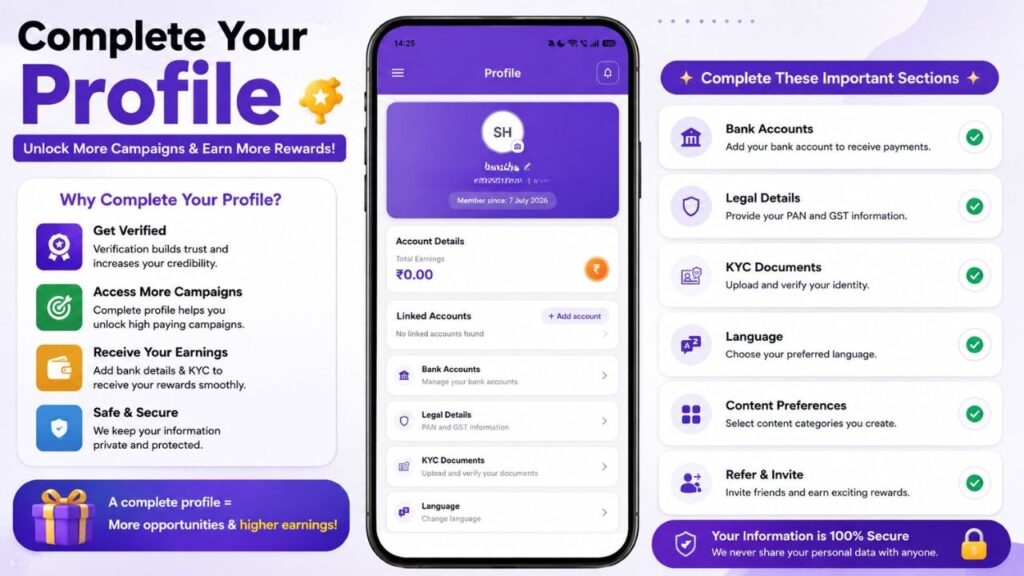
These include:
- Bank Accounts
- Legal Details
- KYC Documents
- Language
- Content
- Refer & Invite
- Support
- Settings
- Privacy Policy
- Terms & Conditions
Completing the required information can make the account ready for campaign participation and payment-related processes where applicable.
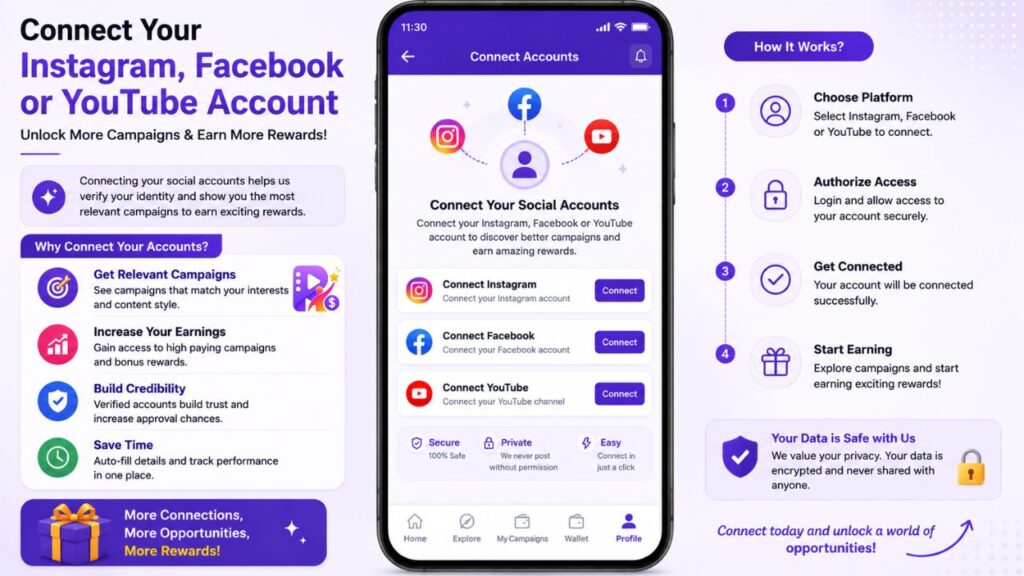
Step 2: Connect Your Instagram, Facebook or YouTube Account
Go to the Platform section. Here, you can find different social media options.
| Social Platform | Suitable For |
|---|---|
| Reels, posts and influencer promotions | |
| Facebook content and promotional campaigns | |
| YouTube | Long-form video creators |
| YouTube Shorts | Short-form video creators |
Choose the platform you want to connect and follow the authorisation process shown by the app.
It is important to connect only your genuine social media accounts and carefully review the permissions displayed during account connection.
Step 3: Explore Available Campaigns
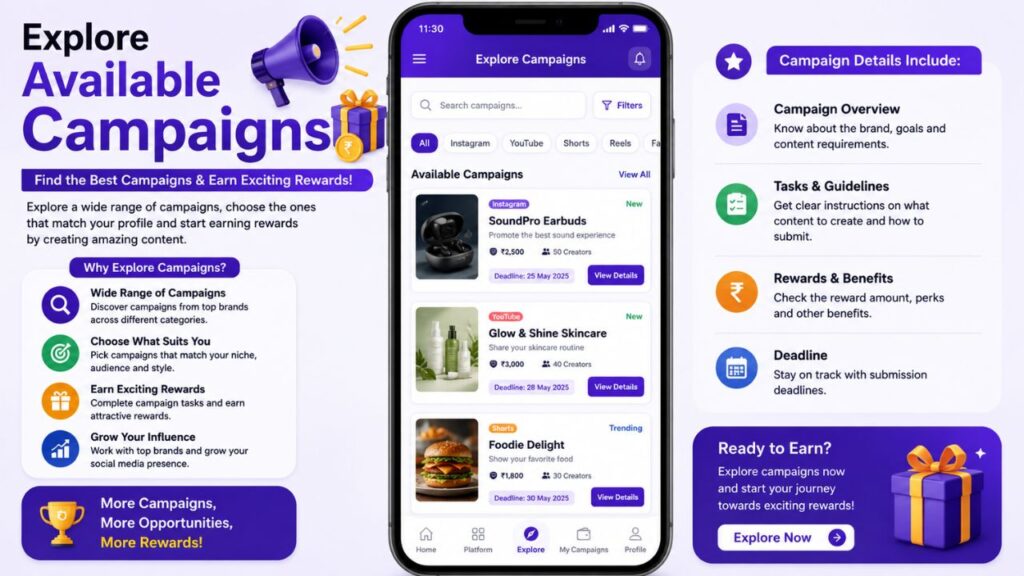
Once your account is ready, you can go to Home and select Explore Campaigns or View All. The campaign page allows creators to explore available opportunities.
Campaign availability may depend on factors such as platform, creator eligibility, campaign requirements and current availability.
Therefore, seeing no campaigns at a particular time does not necessarily mean that the platform will never have campaigns for you.
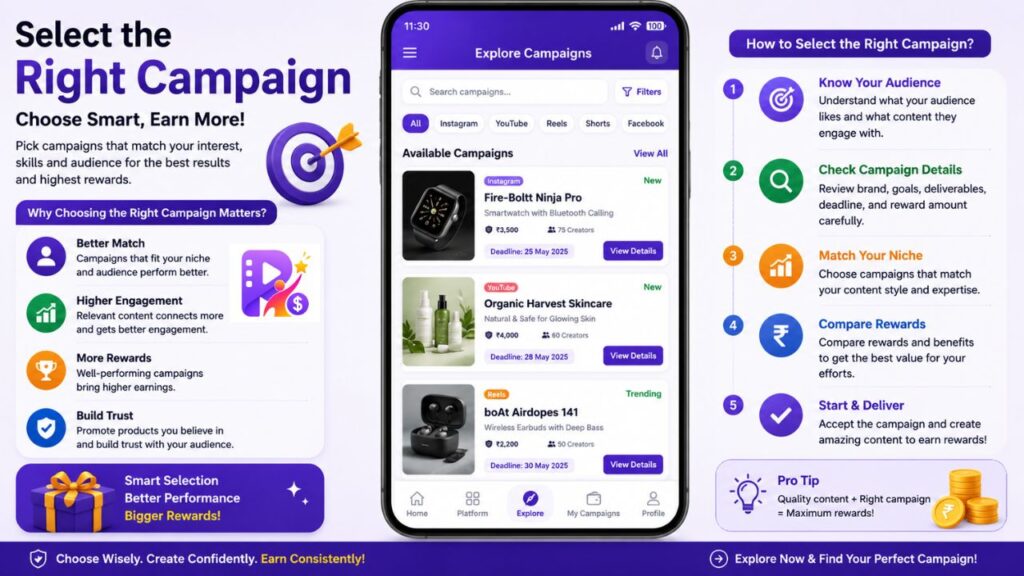
Step 4: Select the Right Campaign
Before joining a campaign, do not simply look at the reward amount. First understand the complete campaign requirements.
| Things to Check | Why It Matters |
|---|---|
| Platform | Make sure you have the required social account |
| Content Type | Check whether it requires a Reel, video, Short or post |
| Deadline | Make sure you can complete the campaign on time |
| Views/Engagement | Some campaigns may have performance requirements |
| Content Rules | Follow the brand’s instructions |
| Reward | Understand the applicable reward |
| Approval | Check whether content needs approval |
| Submission | Understand how and where to submit the content |
Reading these details before accepting a campaign can help prevent rejection or incomplete submissions.
Step 5: Create the Required Content
After selecting a campaign, create the content according to its instructions.
For example, a campaign may require:
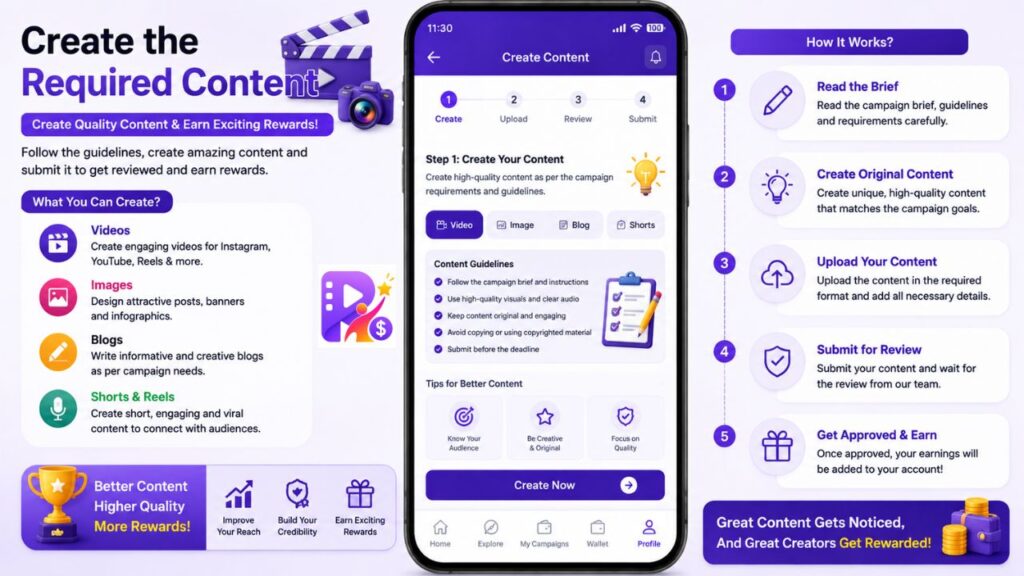
- An Instagram Reel
- A Facebook post
- A YouTube video
- A YouTube Short
Creators should make sure the content follows all campaign guidelines before publishing or submitting it.
The quality of your content, audience engagement and campaign compliance can be important depending on the campaign.
Step 6: Track Your Campaigns
The My Campaigns section helps creators keep track of their campaign activities.
The screen provides different categories such as:
- Active
- Reward
- Completed
- Rejected
This can be useful because creators do not have to remember the status of every campaign separately.
The interface also provides Compact and Detailed viewing options.
How to Download ReelsReward App?
If you are interested in joining influencer campaigns through ReelsReward, the first step is to download the app on your smartphone.
The Reels Reward App is currently available on the Google Play Store for Android users. The Play Store listing identifies the app as “Reels Reward App” and describes it as a creator rewards platform for influencers and content creators.
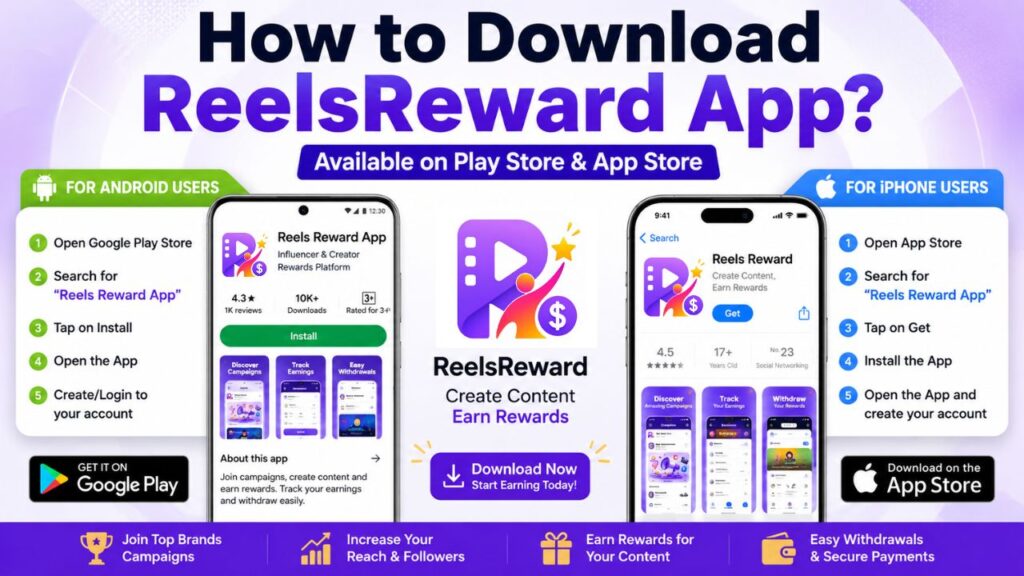
Download ReelsReward on Android
Android users can download the app directly from the Google Play Store.
To download it:
- Open the Google Play Store on your Android smartphone.
- Search for “Reels Reward App”.
- Check the app name before installing it.
- Open the official app listing.
- Tap the Install button.
- Wait until the installation is completed.
- Open the app and create or log in to your account.
- Complete your profile and connect the required social media accounts.
The app is listed on Google Play under the package name com.reels.reward.
Where Can You Download It?
| Device | Availability | Where to Get It |
|---|---|---|
| Android Phone | Available | Google Play Store |
| iPhone | App Store listing available | Apple App Store |
| iPad | App Store listing available | Apple App Store |
The iOS listing is titled “Reels Reward – Create Content, Earn Rewards” and is listed for iPhone and iPad.
ReelsReward Wallet: Track Your Earnings
The Wallet is one of the most important sections for creators who participate in campaigns.
It provides information about the creator’s financial activity within the platform.
The Wallet screen includes:
| Wallet Information | Meaning |
|---|---|
| Total Balance | Overall balance shown in the wallet |
| Available | Amount currently available according to the platform |
| Credits | Amount credited/earned |
| Debits | Amount deducted/spent |
| Transactions | Transaction history |
| Pending | Pending withdrawal requests |
| Withdrawals | Withdrawal-related information |
The app also provides a Withdraw option for eligible balances.
However, users should understand that creating an account or installing the app does not automatically generate earnings.
Earnings depend on factors such as available campaigns, eligibility, successful campaign completion, performance requirements and applicable payment conditions.
Bank Account and KYC Details
The Profile section contains separate options for Bank Accounts, Legal Details and KYC Documents. These features can be important for account verification and payment processing.
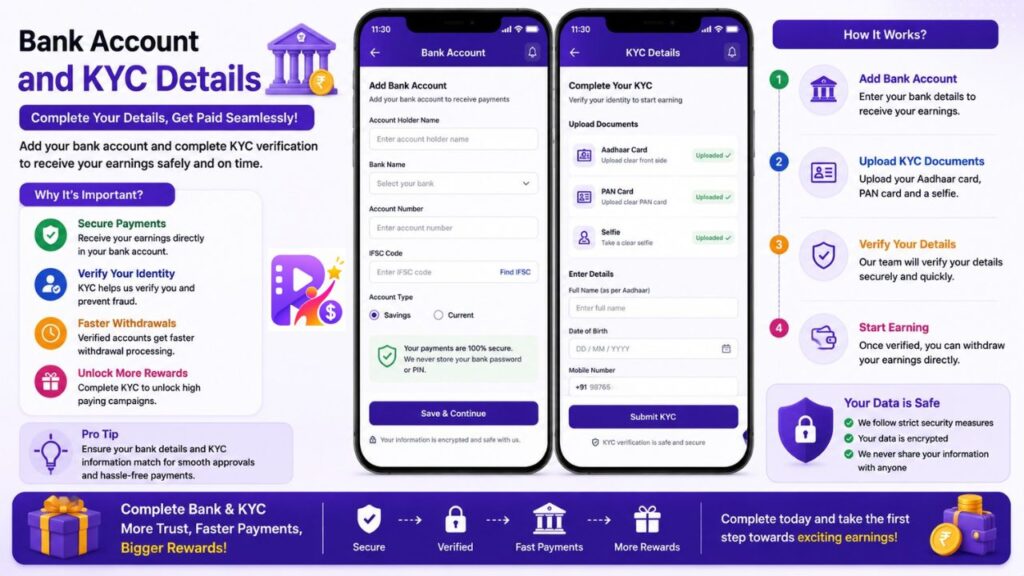
Bank Accounts
Users can manage their bank account information through the Bank Accounts section where applicable.
Legal Details
The app provides a section related to PAN and GST information.
KYC Documents
The KYC section allows users to upload and verify the documents required by the platform.
[IMAGE PLACEHOLDER – Add the Profile/KYC/Bank Account screen image here]
Users should always provide accurate information and upload genuine documents.
My Campaigns: Keep Everything Organized
Creators may participate in multiple campaigns over time.
Managing all these campaigns manually can become confusing.
The My Campaigns section helps organize campaigns according to their status.
| Campaign Status | What It Indicates |
|---|---|
| Active | Campaigns currently being worked on |
| Reward | Campaigns associated with reward processing |
| Completed | Campaigns that have been completed |
| Rejected | Campaigns that were not approved or accepted |
This makes it easier for creators to understand what needs their attention.
Refer & Invite
The Profile section also contains a Refer & Invite option. This feature can allow users to invite friends or other creators to the platform according to the applicable referral program.
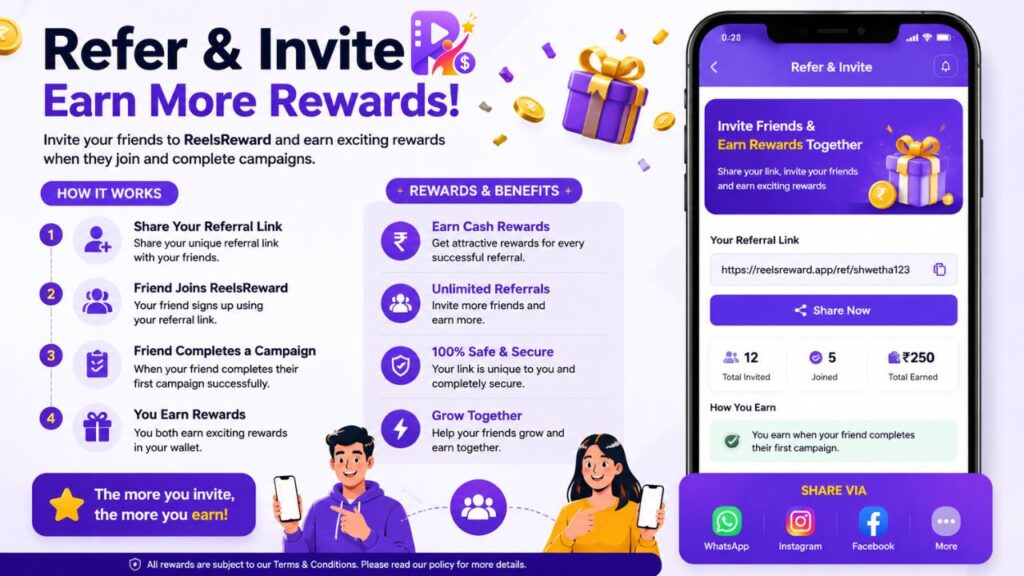
Before relying on referral earnings, users should check the current referral conditions and eligibility rules inside the app.
Support and Settings
ReelsReward also provides a Support section for users who need assistance.
The Profile menu additionally includes Settings, Privacy Policy and Terms & Conditions.
These sections are useful for understanding how the account works and reviewing the platform’s policies.
[IMAGE PLACEHOLDER – Add the ReelsReward Side Menu/Profile Menu screenshot here]
What Are the Main Benefits of ReelsReward?
| Benefit | Explanation |
|---|---|
| Campaign Discovery | Find available creator campaigns in one place |
| Multiple Platforms | Supports Instagram, Facebook, YouTube and YouTube Shorts |
| Campaign Tracking | Monitor campaign status through My Campaigns |
| Wallet | View earnings and transaction information |
| Account Management | Manage profile and social accounts |
| KYC | Upload and verify required documents |
| Bank Details | Manage payment-related account information |
| Support | Access assistance when required |
ReelsReward vs Traditional Campaign Searching
Finding influencer campaigns traditionally can require a lot of manual work.
| Traditional Method | ReelsReward Approach |
|---|---|
| Search for brands individually | Explore campaigns through one platform |
| Contact brands separately | Participate through listed campaigns |
| Track campaigns manually | Use My Campaigns |
| Track payments separately | Use Wallet |
| Manage different opportunities | Centralized campaign management |
| Difficult to know campaign status | Status categories are available |
The goal is to make the creator’s campaign journey more organized and easier to manage.
Who Can Use ReelsReward?
ReelsReward can be particularly interesting for people who are already creating content on social media.
Instagram Creators
Instagram creators who regularly create Reels or promotional content can explore Instagram campaigns.
YouTubers
Creators who produce long-form YouTube videos can look for campaigns related to YouTube.
YouTube Shorts Creators
Creators focused on short-form videos can explore campaigns specifically associated with YouTube Shorts.
Facebook Creators
Creators who have an active Facebook audience can explore Facebook-related campaigns.
New Influencers
Even growing creators can explore the platform to discover potential campaign opportunities instead of waiting for brands to contact them directly.
However, eligibility is not necessarily the same for every campaign, so users should always read the individual campaign requirements.
Is ReelsReward a Guaranteed Earning App?
No app should be treated as a guaranteed-income platform simply because it displays rewards or campaigns.
ReelsReward provides a platform for discovering and participating in campaigns, but the actual earning opportunity depends on the campaigns available to you and whether you successfully meet their requirements.
Your results may depend on:
- Campaign availability
- Your social media platform
- Creator eligibility
- Content quality
- Views and engagement
- Campaign instructions
- Approval
- Completion requirements
- Payment terms
Therefore, users should treat ReelsReward as a campaign and influencer opportunity platform, not as a guaranteed source of fixed monthly income.
Important Safety Tips for Users
Before using any influencer or earning platform, it is always important to be careful.
| Safety Tip | What You Should Do |
|---|---|
| Account Security | Never share your social media password with anyone |
| KYC | Upload only genuine documents |
| Campaign Rules | Read requirements before accepting |
| Payment Terms | Understand reward and withdrawal conditions |
| Social Accounts | Connect only your own accounts |
| Permissions | Review permissions before authorising access |
| Earnings | Do not assume fixed or guaranteed income |
| Content | Follow campaign guidelines carefully |
Final Verdict
ReelsReward is designed to bring influencer campaign discovery and campaign management into one convenient platform.
For creators who are already active on Instagram, Facebook, YouTube or YouTube Shorts, the app can provide a structured way to explore promotional campaigns instead of searching for opportunities manually.
Its key features include campaign discovery, social media account connection, My Campaigns, Wallet, KYC, bank account management and support.
The biggest advantage is that different parts of the creator journey can be managed from one app.
However, users should always remember that campaign availability and earnings are not guaranteed. Each campaign can have its own eligibility criteria, content requirements, performance conditions and payment terms.
If you are a content creator looking for opportunities to collaborate with campaigns and want a platform where you can discover campaigns, track participation and manage eligible rewards, ReelsReward can be worth exploring.