Land measurement can be confusing, especially in India, where traditional land units vary from one state to another. Terms such as Guntha, Cent, Bigha, Marla, Kanal, Kattha, Ground, Decimal and Acre are commonly used, but their values are not always the same across different regions.
This is where Land Calculator AI can be useful. It is a state-wise land unit conversion and calculation platform designed to help users convert traditional land measurement units into other local or standard units. The platform also provides additional tools such as unit price calculation, plot pricing, length conversion, area conversion, volume conversion and weight conversion.
| Details | Link |
|---|---|
| Download the Land Calculator AI App | Google Play Store |
| Official Website | landcalculatorai.com |
The screenshots provided with this article show the app’s mobile-friendly interface, including the Karnataka Land Calculator, India States, All Countries, Tools and More sections. The official Land Calculator AI website describes the platform as a free, browser-based tool with state-specific calculators, 50+ land units and calculators covering Indian states as well as countries around the world.
What Is Land Calculator AI?
Land Calculator AI is an online land measurement and unit conversion tool that helps users calculate and convert land measurements according to the units commonly used in different states and regions. Instead of using one universal conversion formula for every location, the platform provides state-specific calculators. This is particularly important in India because the same land-unit name can represent different areas in different states.
For example, the value of a Bigha can vary considerably from one state to another. Therefore, selecting the correct state before performing a conversion is an important feature of the platform.
Main Purpose of the App
The main purpose of Land Calculator AI is to make land-unit calculations easier for ordinary users, landowners, farmers, property buyers, sellers, real-estate professionals and others who regularly deal with land measurements.
Key Features of Land Calculator AI
According to the website and the screenshots, the platform provides several useful features.
1. State-Wise Land Calculators
The platform provides dedicated calculators for Indian states.
- Karnataka
- Kerala
- Tamil Nadu
- Telangana
- Andhra Pradesh
- Maharashtra
- Gujarat
- Goa
- Rajasthan
- Punjab
- Haryana
- Himachal Pradesh
- Uttar Pradesh
- Uttarakhand
- Bihar
- Jharkhand
- Odisha
- West Bengal
- Assam
- Manipur
- Meghalaya
- Mizoram
- Nagaland
- Sikkim
- Tripura
- Arunachal Pradesh
- Chhattisgarh
- Madhya Pradesh
- Delhi
Each state calculator is designed around the traditional land units commonly used in that state.
Karnataka Land Calculator
The Karnataka calculator provides options for working with land units relevant to the state.
Area | Price
followed by:
From Unit | To Unit | Enter Value
This makes it possible to select a starting unit, select the unit into which the value should be converted, enter the quantity and calculate the result.
How to Use Land Calculator AI
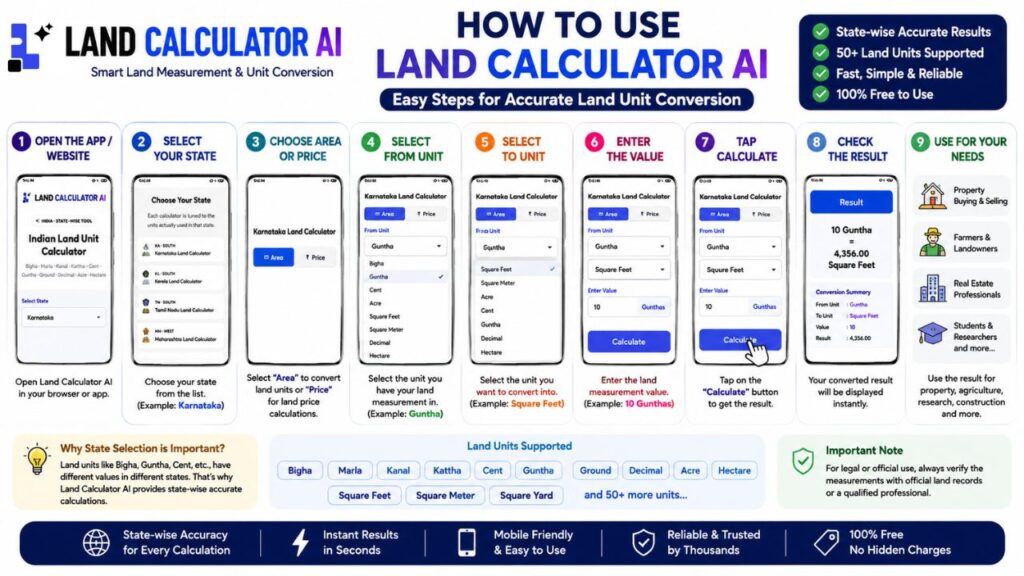
Step 1: Open Land Calculator AI
Open the official Land Calculator AI website in your mobile browser or computer browser.
The home page displays the LAND CALCULATOR AI branding and provides access to the different calculator sections.
Step 2: Select Your State
On the home page, go to the state selection section.
You will see an option similar to:
Choose Your State
The platform groups states according to regions such as:
- North India
- South India
- East India
- West India
- NorthEast India
- Central India
The India States page shown in the screenshot displays North India with states including Delhi, Haryana, Himachal Pradesh, Punjab, Uttar Pradesh and Uttarakhand.
Other regions can be expanded to view their respective states.
Step 3: Select Karnataka
If you are calculating land measurements for Karnataka, select:
Karnataka
KA · SOUTH
Karnataka Land Calculator
- After selecting it, the Karnataka-specific calculator opens.
- This is important because local land units can differ between states.
Step 4: Choose Area or Price
Area
Select Area when you want to convert one land measurement unit into another.
For example, you may want to convert a value from Guntha to Square Feet.
Price
Select Price when you want to work with land-price calculations.
This can be useful when you know the price associated with a particular quantity of land and want to calculate the corresponding value.
Step 5: Select the “From Unit”
The From Unit option determines the unit of the value you already have.
For example:
From Unit: Guntha
If you know that a piece of land measures a particular number of Gunthas, select Guntha here.
Depending on the selected state, the available units can change.
Step 6: Select the “To Unit”
Next, select the unit into which you want to convert your land measurement.
For example:
To Unit: Square Feet
Now the calculator knows that the entered value should be converted from Guntha into Square Feet.
Step 7: Enter the Value
Enter the land measurement in the Enter Value field.
For example:
10 Guntha
The exact number can be changed according to your land measurement.
Step 8: Calculate
- After entering the value, press the Calculate button.
- The calculator processes the conversion and displays the result.
- This saves users from manually searching for conversion formulas or calculating the values themselves.
Step 9: Check the Result
After calculation, the converted value will be displayed.
For important property-related transactions, users should cross-check the result with official land records, a qualified surveyor or the appropriate local authority before using the value for legal purposes.
A calculator should be treated as a calculation aid rather than a replacement for official property documentation.
What Land Units Does Land Calculator AI Support?
The platform supports many traditional and standard land measurement units.
Some of the units include:
- Bigha
- Marla
- Kanal
- Kattha
- Cent
- Guntha
- Ground
- Decimal
- Acre
- Hectare
- Square Feet
- Square Meter
- Square Yard
The platform supports 50+ land units, according to its official website.
The exact units available depend on the state or country selected.
Why Is State Selection Important?
- This is one of the most important things users should understand before using a land calculator.
- India does not have one universal value for every traditional land unit.
- For example, a unit such as Bigha may have different values in different states.
- Therefore, simply searching for “1 Bigha to Square Feet” may not always give the appropriate local result.
- Land Calculator AI addresses this issue by providing separate calculators for different Indian states.
Example:
- Suppose two people own land in two different states and both describe their land as “Bigha.”
- The numerical value may not represent the same area.
- Therefore, the recommended process is:
- Select the State → Select the Local Unit → Enter the Value → Convert
- This is a more appropriate approach than using a generic conversion table.
All Countries Feature
- This section is not limited to India.
- The screenshots show countries under different geographical regions.
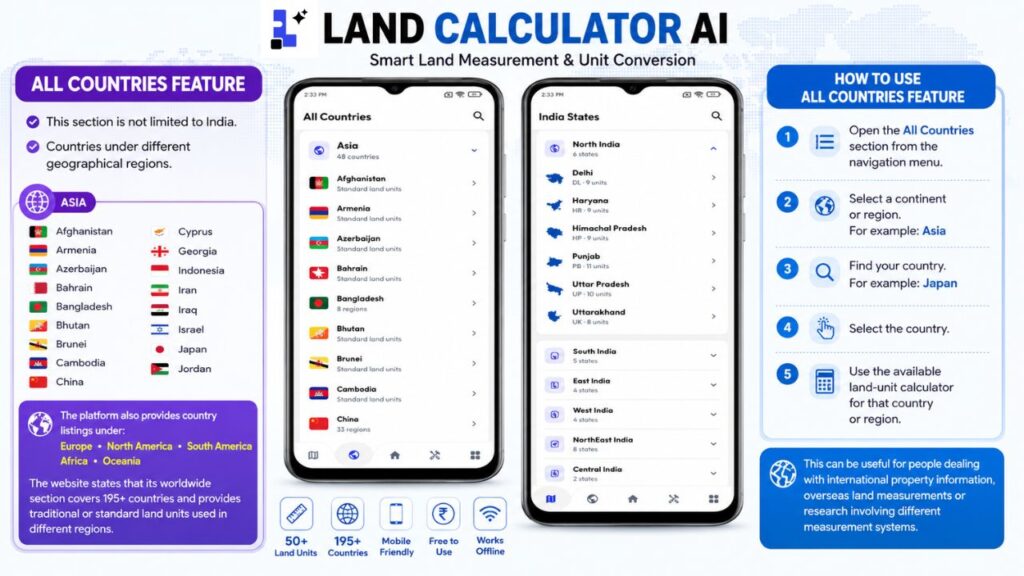
Asia
- Afghanistan
- Armenia
- Azerbaijan
- Bahrain
- Bangladesh
- Bhutan
- Brunei
- Cambodia
- China
- Cyprus
- Georgia
- Indonesia
- Iran
- Iraq
- Israel
- Japan
- Jordan
The platform also provides country listings under:
- Europe
- North America
- South America
- Africa
- Oceania
The website states that its worldwide section covers 195+ countries and provides traditional or standard land units used in different regions.
How to Use the All Countries Feature
Using the international section is also straightforward.
Step 1: Open the All Countries section from the navigation menu.
Step 2: Select a continent or region.
For example: Asia
Step 3: Find your country.
For example: Japan
Step 4: Select the country.
Step 5: Use the available land-unit calculator for that country or region.
This can be useful for people dealing with international property information, overseas land measurements or research involving different measurement systems.
India States Section
The India States section is another important part of the platform.
Instead of scrolling through every state on the home page, users can open the India States section and browse states according to region.
North India
6 states
- Delhi
- Haryana
- Himachal Pradesh
- Punjab
- Uttar Pradesh
- Uttarakhand
South India
5 states
East India
4 states
West India
4 states
NorthEast India
8 states
Central India
2 states
This regional organisation makes it easier to locate the required state.
Tools Section in Land Calculator AI
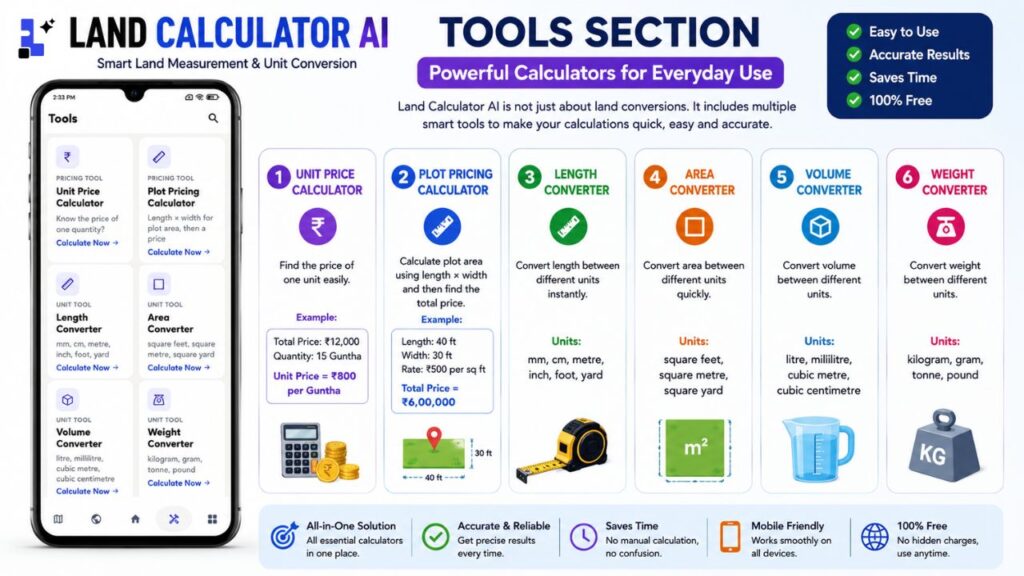
Land Calculator AI is not limited to land-unit conversion.
1. Unit Price Calculator
The Unit Price Calculator is designed for situations where you know the price of one quantity and want to determine the corresponding unit price or calculation.
It can be useful when comparing land or material prices based on quantity.
2. Plot Pricing Calculator
The Plot Pricing Calculator is designed around plot dimensions and pricing.
Length × Width for plot area, then a price
This can be useful when estimating the area of a rectangular plot and calculating its approximate price based on a given rate.
3. Length Converter
The Length Converter can be used to convert between common length measurements.
- Millimetre
- Centimetre
- Metre
- Inch
- Foot
- Yard
This can be useful when dealing with plot dimensions, construction measurements or general measurement conversions.
4. Area Converter
The Area Converter is designed for converting area measurements.
- Square Feet
- Square Metre
- Square Yard
This can be useful for people working with house sites, plots, agricultural land and other property measurements.
5. Volume Converter
The Volume Converter supports measurements such as:
- Litre
- Millilitre
- Cubic Metre
- Cubic Centimetre
It can be useful for general measurement calculations beyond land.
6. Weight Converter
The Weight Converter includes units such as:
- Kilogram
- Gram
- Tonne
- Pound
This makes the Tools section useful not only for land calculations but also for everyday measurement conversions.
How to Install Land Calculator AI on Your Phone
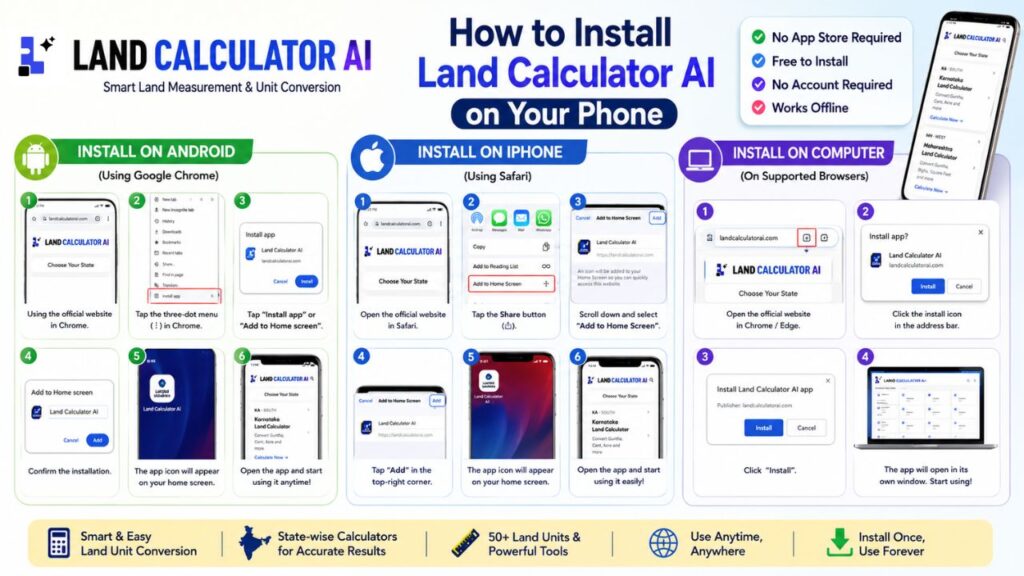
- An important point about this platform is that it is presented as an installable web app, rather than requiring a conventional app-store download.
- The official website’s installation panel says: “No app store” and explains that users can add the application to their phone’s home screen.
- The installation is free and does not require an account.
Therefore, users should not necessarily search Google Play Store for a conventional Android APK or app listing.
How to Install on Android
If you are using Google Chrome on Android:
Step 1: Open the official Land Calculator AI website.
Step 2: Tap the three-dot menu in Chrome.
Step 3: Look for: Install app
or Add to Home screen
Step 4: Tap the available installation option.
Step 5: Confirm the installation.
Step 6: The Land Calculator AI icon will appear on your phone’s home screen.
How to Install on iPhone
If you are using Safari on an iPhone:
Step 1: Open the Land Calculator AI website in Safari.
Step 2: Tap the Share button.
Step 3: Scroll down.
Step 4: Select: Add to Home Screen
Step 5: Tap Add in the top-right corner.
The Land Calculator AI shortcut will then appear on your iPhone’s home screen.
How to Install on a Computer
The platform can also be installed on supported desktop browsers.
Step 1: Open the Land Calculator AI website.
Step 2: Look for an installation icon in the browser’s address bar.
Step 3: Click the install icon.
Step 4: Click Install. After installation, the app can open in its own window.
Does Land Calculator AI Require an Account?
According to the official website’s installation information, the installable version is free and does not require an account. This makes the platform convenient for users who simply want to perform land calculations without creating a separate account.
Does It Work Offline?
- The installation section of the official website states that the installed version provides offline access.
- This can be useful when users are working in locations where internet connectivity is weak or unavailable.
- Users should initially open and install the web app while connected to the internet so the required resources can be loaded.
Who Can Use Land Calculator AI?
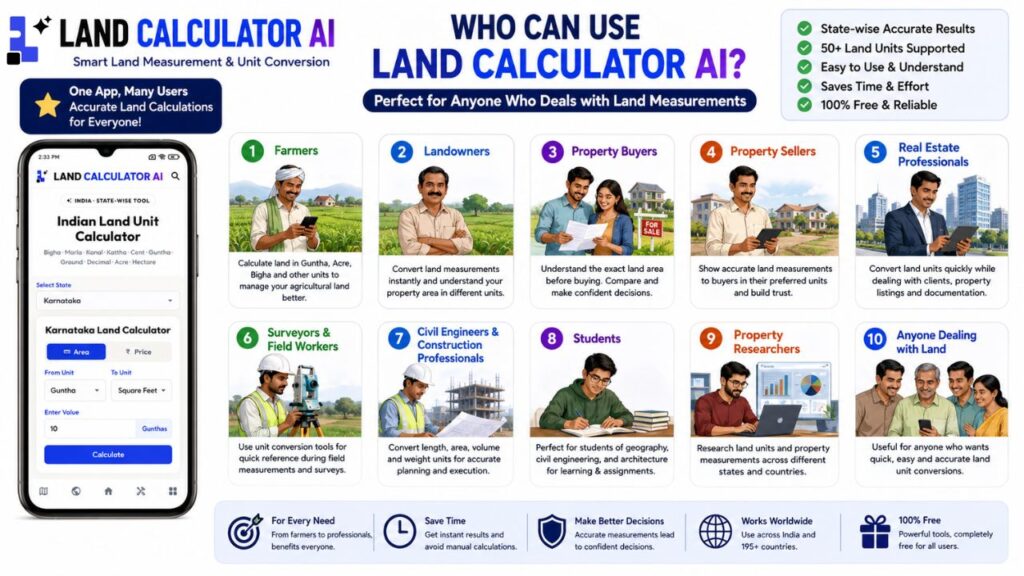
Land Calculator AI can be useful for a wide range of users.
1. Farmers
- Farmers can use the calculator to understand land measurements in local units.
- For example, someone may need to convert land between Guntha, Acre or Square Feet.
2. Landowners
- Property owners can use it to quickly understand the approximate area of their land in different measurement units.
3. Property Buyers
- People planning to purchase land can use the calculator to understand the area mentioned by a seller or property listing.
For example, if a property is described in Guntha but the buyer is more familiar with Square Feet, the calculator can help with the conversion.
4. Property Sellers
- Sellers can use it to communicate land measurements in different units when dealing with potential buyers.
5. Real Estate Professionals
- Real-estate agents and property consultants often work with different land measurements.
- A state-specific calculator can help them perform quick conversions while discussing properties.
6. Surveyors and Field Workers
- Surveyors and field workers can use unit-conversion tools as a supporting calculation utility.
- However, official surveying and legal boundary determination should always be performed using appropriate professional methods and equipment.
7. Civil Engineers and Construction Professionals
- Construction professionals frequently deal with area, length and plot measurements.
- The additional Length Converter and Area Converter can be useful for quick calculations.
8. Students
- Students studying geography, mathematics, civil engineering, surveying or land measurement can use the platform as a convenient conversion reference.
9. Property Researchers
- People researching property markets in different states or countries can use the state-wise and country-wise sections to understand local measurement terminology.
Why Should You Use or Install Land Calculator AI?
There are several reasons why users may find this platform useful.
1. State-Specific Calculations
- One of its biggest advantages is the state-specific approach.
- Instead of treating every Indian state as having identical traditional land units, the platform provides separate state calculators.
2. Many Land Units
- The platform supports more than 50 land units according to its website.
3. Simple Interface
The screenshots show a clean interface with clearly separated fields for:
- From Unit
- To Unit
- Enter Value
- Calculate
This makes it relatively easy for beginners to understand.
4. Mobile-Friendly Design
- The interface is designed for smartphones, tablets and desktop screens.
5. Additional Tools
Users get access to more than land conversion.
The Tools section includes:
- Unit Price Calculator
- Plot Pricing Calculator
- Length Converter
- Area Converter
- Volume Converter
- Weight Converter
6. International Coverage
- The All Countries section extends the platform beyond India, with the website stating coverage of 195+ countries.
7. No Traditional App-Store Installation Required
- Users can install the platform directly from the website as a web app.
8. Free to Use
- The official website describes the calculators as free and says the installation is free with no account required.
What Does the “More” Section Offer?
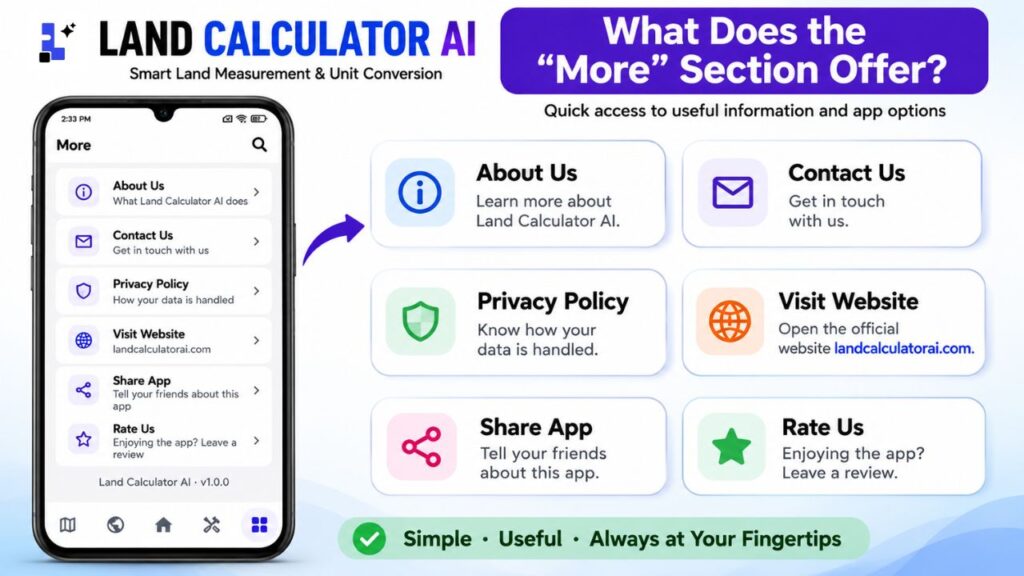
About Us
This section provides information about what Land Calculator AI does.
Contact Us
Users can use this section to get in touch with the platform.
Privacy Policy
This section explains how information and data are handled.
Visit Website
This takes users back to the Land Calculator AI website.
Share App
Users can share the application/platform with friends and family.
Rate Us
Users can leave a review or rating.
Simple Navigation Guide
For beginners, the main navigation can be understood like this:
- India States: Use this when you want to select an Indian state and use its local land calculator.
- All Countries: Use this when you want to find land units for countries outside India.
- Home: Use this for the main land calculator and quick access to state calculators.
- Tools: Use this for Unit Price, Plot Pricing, Length, Area, Volume and Weight calculators.
- More: Use this for About Us, Contact, Privacy Policy, Website, Share and Rate options.
Land Calculator AI vs Manual Calculation
Traditionally, people may have to:
- Search for the local unit definition.
- Find the conversion formula.
- Calculate manually.
- Check whether the formula applies to their state.
- Convert the result again into Square Feet, Acre or another unit.
Land Calculator AI attempts to simplify this process by bringing state-specific conversion options into one interface. Instead of searching separately for each conversion, users can select the state, select the units and enter the value.
Advantages of Land Calculator AI
The major advantages include:
- State-wise land calculators
- Support for traditional Indian land units
- Standard-unit conversions
- 50+ land units
- India States section
- All Countries section
- 195+ country coverage according to the website
- Unit Price Calculator
- Plot Pricing Calculator
- Length Converter
- Area Converter
- Volume Converter
- Weight Converter
- Mobile-friendly interface
- Browser-based calculations
- Installable web-app experience
- Free installation
- No account required for installation
- Offline access after installation
Final Verdict:
Land Calculator AI is a useful digital tool for people who frequently deal with land measurements and unit conversions. Its biggest advantage is the state-specific approach. Instead of assuming that a traditional unit has the same value everywhere, the platform provides separate calculators for different Indian states. For Karnataka users, the dedicated Karnataka Land Calculator can be particularly useful for converting local land measurements into other supported units. The platform also provides calculators for many other Indian states and a worldwide section covering countries across Asia, Europe, North America, South America, Africa and Oceania.
The additional Tools section makes it more useful for everyday calculations by providing Unit Price, Plot Pricing, Length, Area, Volume and Weight converters. Another major advantage is that users do not necessarily need to download a traditional APK from an app store. The official website provides an installable web-app option, allowing users to add Land Calculator AI to their phone’s home screen. The site says the installation is free, requires no account and provides offline access. For anyone who owns land, is planning to buy or sell property, works in real estate, agriculture, surveying or construction, or simply wants a convenient way to convert traditional land units, Land Calculator AI can be a useful calculation companion.
Important: For property registration, legal disputes, inheritance, official surveys or high-value transactions, always verify calculated measurements against official records and qualified professionals before making a final decision.